

ASIO4ALL
About ASIO4ALL
ASIO4ALL gives ordinary audio hardware the low-latency ASIO driver its makers never wrote, and for generations of home musicians it has been the difference between playing an instrument and playing a slideshow. Music software speaks ASIO to reach sound hardware with minimal delay, professional interfaces ship such drivers, and onboard chips plus most cheap USB devices simply don’t.
This small driver wraps whatever hardware the system has and presents it to recording software as a proper ASIO device, dropping the delay between pressing a key and hearing the note from an unplayable hundred-plus milliseconds to a handful.
If you’ve ever connected a MIDI keyboard, hit a note, and heard it arrive noticeably late, that gap is the entire reason this driver exists. Latency at that scale makes real-time playing impossible, and ASIO4ALL is the standard free cure on hardware without a native driver of its own.
The one honest instruction before anything else. If your audio interface came with its own ASIO driver, use that instead, since the manufacturer’s driver talks to its own hardware more directly than any universal wrapper can. This tool is for everyone else, the laptop’s built-in chip, the headset, the budget USB device with no proper driver behind it.
What it does and how the trick works
Recording software lists ASIO4ALL as an audio device like any other, and selecting it activates the wrapper. Underneath, it bypasses the system’s sound mixer and talks to the hardware through the lowest-level path the standard drivers expose, which is where the latency savings come from. The system mixer adds buffering and processing designed for casual playback, and skipping it is precisely what ASIO was invented to do.
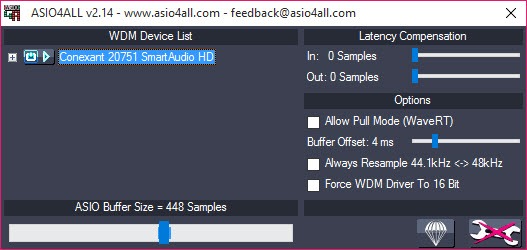
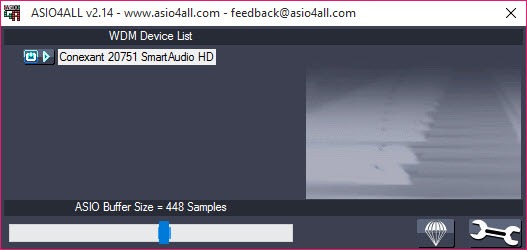
The control panel appears from the tray icon while a host application uses the driver, and its centerpiece is the buffer size slider. Smaller buffers mean lower latency and higher CPU strain, larger buffers mean safety and sluggishness, and the practical method is unglamorous, lower the buffer until playback crackles, then step back up one notch. On a healthy machine, buffers translating to under ten milliseconds are routine, comfortably inside the range where playing feels immediate.
One truly unusual power hides in the device list. Each input and output can be switched on individually, including across different hardware at once, so the microphone of one device can pair with the speakers of another inside a single ASIO setup, an aggregation trick that even expensive native drivers usually refuse.
The exclusive access surprise
The most common shock arrives five minutes after installation. While the recording software holds the driver, it typically owns the audio hardware outright, and every other sound on the computer goes silent, the browser, the media player, everything. Nothing is broken. Exclusive hardware access is part of how the latency gets so low, and the sound returns when the recording software releases the device or closes.
Musicians learn to live with it or route around it. Living with it means treating the recording session like a studio, one purpose at a time. Routing around it means a virtual mixer such as VoiceMeeter Banana sitting between applications and hardware, sharing sound at the cost of some of the latency the setup existed to remove.
There is no third option, and knowing that in advance saves the standard hour of confused troubleshooting.
When it crackles, and what actually helps
Crackles and dropouts at small buffers are the recurring complaint, and they are almost never the driver’s fault alone. Pops that persist even at moderate buffer sizes usually point at the system itself, drivers elsewhere hogging the processor at exactly the wrong microsecond, and a diagnostic like LatencyMon names the guilty component in minutes, with network and graphics drivers the usual suspects.
Beyond that, the control panel’s advanced options earn their keep case by case. The hardware buffer option helps some chips and harms others, latency compensation aligns recordings that land slightly off the beat, and per-application setups mean the settings that suit a heavyweight production session don’t have to match the ones for a quick voice take in Audacity. Trial, error, and one saved good configuration is the honest workflow.
The ceiling deserves stating plainly. A wrapper cannot make bad hardware good, onboard chips keep their noise floors and conversion quality, and what improves is strictly the delay.
For recording quality itself, the hardware market has the answers, and this driver will happily wrap whatever arrives.
Conclusion
ASIO4ALL serves the bedroom producer on a laptop, the beginner with a MIDI keyboard and no interface yet, and anyone whose USB audio device shipped without a real driver. It turns the latency that makes playing impossible into a delay too small to notice, and it costs nothing but the exclusive-access adjustment.
Owners of proper interfaces should stay with their native drivers, and chronic cracklers should suspect their systems before the wrapper. In the enormous middle ground of ordinary hardware, this little driver has quietly enabled more first recordings than any studio ever will.
Pros & Cons
- Brings usable low-latency ASIO to hardware with no native driver
- Buffer slider makes the latency-versus-stability trade direct and visible
- Aggregates inputs and outputs from different devices into one setup
- Per-application settings remember what each program needs
- Tiny, unobtrusive, and active only while a host uses it
- Exclusive access silences all other system sound during sessions
- Cannot match a manufacturer's native ASIO driver on the same hardware
- Small buffers expose system-wide driver problems as crackles
- Improves delay only, never the hardware's actual sound quality
Frequently asked questions
No, use the manufacturer's ASIO driver, which reaches its own hardware more directly. This wrapper is for onboard chips and devices that never received a proper driver.
The driver takes exclusive control of the hardware, which is part of how the latency drops. Other applications regain sound when the music software releases the device.
Start moderate, lower it until playback crackles, then go one step back up. On healthy systems that lands under ten milliseconds, which feels immediate when playing.
Something else on the system is stalling the processor, typically a network or graphics driver. A latency diagnostic tool identifies the culprit, and updating or disabling it cures the pops.
Yes, the device list enables individual inputs and outputs across different hardware, so one device's microphone can work alongside another's outputs in the same session.


