

AirServer
About AirServer
A room with a screen at one end and a dozen devices in it needs a way to get one onto the other. AirServer turns the computer driving that screen into a destination those devices can cast to, and it accepts all three of the mirroring systems in common use rather than one.
That is the AirServer argument in a sentence. A room with mixed devices needs a receiver that speaks to all of them, and a receiver handling one protocol serves half the people in it.
Everything else depends on the network, which the maker says more plainly than most.
The network is the problem, and the maker says so
Here is the AirServer sentence worth the whole article, taken from the maker’s own deployment guidance, which states that almost all performance and connection problems customers report come down to network performance or settings.
That is unusually direct for a maker to say, and it is accurate. The software works. The discovery does not, because of how the discovery works.
Two of the three protocols find their destination using a discovery mechanism that relies on multicast messages, and those messages do not cross between network segments with standard equipment settings. So on any network divided into segments, which describes every school, campus and office, the phone and the computer cannot see each other even though both are working correctly.
One university’s own support pages state the position bluntly, saying that because their general wireless does not carry multicast, these services are unsupported in most buildings and work only in rooms specifically configured for them.
So the deciding question is not whether the software is good. It is whether somebody will enable the necessary traffic on the network, and in a managed environment that is a conversation with whoever runs it rather than a setting you change.
The fixes, in the order to try them
The AirServer troubleshooting sequence is documented, and the order matters. Allow the program through the firewall first, since that is named as the most common cause and costs nothing to check.
Then switch off the protocols you are not using. That sounds like superstition and it is the maker’s own advice, because having all three advertising themselves can itself interfere with discovery. A room with only one kind of device should be running only one protocol.
Toggling a protocol off, waiting, and switching it back on resolves discovery problems specifically, which is worth trying before anything more involved.
Then check the router for interface isolation, the setting that stops devices on the same wireless network seeing each other. It is there deliberately on guest networks and it prevents exactly this.
For confirming what is actually visible on the network before blaming anything, Advanced IP Scanner lists what answered.
Several people at once, which is the classroom feature
The AirServer capability that separates it from a consumer receiver. More than one device casts simultaneously and the layout arranges itself around however many are connected, changing as devices switch between upright and sideways.
One can be featured, expanding it while the others shrink, and any can be removed from the display directly. That turns a screen into something a teacher runs rather than a single fixed view.
Naming the receiver matters more than it sounds in a building with several, since a list of identical names is how somebody casts to the wrong room. A room number or a name solves it.
The connection code stops the wrong people casting
The AirServer management feature to switch on immediately. Without it, anybody within range who can discover the receiver can cast to it. In a classroom that is a discipline problem waiting to happen, and in an office it is an interruption.
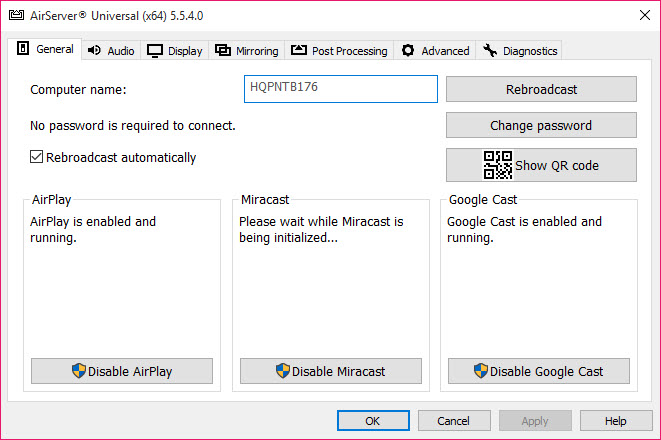
A code displayed on the screen must be entered on the device before it connects, which means presence in the room is required. It applies to each protocol separately, so it needs enabling for each one in use.
That is the difference between a receiver and a receiver you can leave switched on.
Wired for the receiver, wireless for the devices
The arrangement that removes most AirServer performance complaints. Mirroring pushes a continuous video stream across the network, and the maker’s own guidance suggests connecting the receiving computer by cable when performance is poor.
At home, where none of this apparatus is needed, a media player that receives a phone screen alongside playing files covers occasional use.
That makes sense once stated. The devices have no choice but to be wireless, and the receiver does, so putting the fixed end on a cable removes half the wireless traffic and the half most likely to be congested.
Bandwidth is the underlying constraint everywhere. A room where several people share screens at once is moving several video streams over shared wireless, and no software setting compensates for a network that cannot carry them.
What else is in the room
Being fair about the alternatives, since AirServer is a commercial product.
LonelyScreen receives from one platform only and is the simpler option for somebody with one kind of device and no classroom to manage.
Neither handles three protocols, several simultaneous devices, or connection codes, which is what the paid product is actually selling.
Conclusion
AirServer does the thing that matters in a room with mixed devices, which is accepting all of them rather than one, and the classroom features around that, meaning simultaneous casting, featuring a device and requiring a code, are what justify paying for it over the free single-protocol receivers.
Settle the network question before buying anything. The maker states plainly that almost every problem reported comes down to network settings, discovery depends on traffic that managed networks block by default, and no amount of configuring the software fixes a network nobody will change. On a simple flat network it works immediately, and on an institutional one it starts with a conversation.
Pros & Cons
- Receives all three mirroring systems, so mixed rooms are covered
- Several devices cast at once, with the layout adapting automatically
- Any connected device can be featured or removed from the display
- Connection codes require presence in the room before casting
- Recording of what is mirrored, for keeping a session
- Receiver can be named, which matters in buildings with several
- Discovery relies on traffic that managed networks block by default
- Fixing that means a conversation with whoever runs the network
- Running all three protocols can itself interfere with discovery
- Several simultaneous streams need bandwidth no setting can conjure
- Paid, where simpler single-protocol receivers are free
Frequently asked questions
Most likely because discovery uses multicast traffic that does not cross network segments by default, which affects every school and office network. Check the firewall first, then switch off protocols you are not using, then look for interface isolation on the router.
Yes, and the layout arranges itself around however many are connected. Individual devices can be featured or removed, which is what makes it usable as a teaching tool rather than a single fixed view.
Enable the connection code, which displays on the screen and must be typed on the device. It applies per protocol, so switch it on for each one you are using.
A cable, where possible. Mirroring pushes continuous video across the network, the devices have no choice but to be wireless, and putting the fixed end on a cable removes the congestion you can control.


