

KillCopy
About KillCopy
KillCopy is a file copy utility built for the transfers that the standard copy dialog handles badly. Huge files, slow network shares, connections that drop halfway through. It adds two entries to the right-click menu and copies or moves the selection through its own engine. If the job is interrupted, it picks up where it stopped instead of starting over.
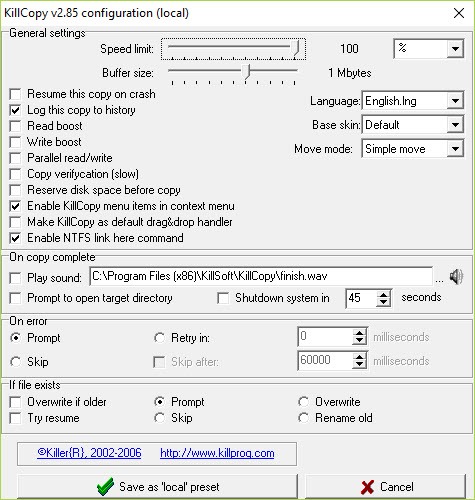
Around that core sit the controls a cautious user wants. A speed limit, an adjustable buffer, verification after copying, a log of every transfer and a choice of what happens when the job finishes, from a sound to shutting the computer down.
Development stopped long ago, so this is an old tool, but the problems it solves have not changed.
Resume instead of restart
The headline feature is resumption. If the system crashes or the network drops in the middle of a large copy, KillCopy continues the job after a restart rather than discarding what was already written. Cancel a copy while holding Shift, and it can be resumed manually later.
The Try Resume option handles a related case. When a target file already exists, the program checks it at five points against the source, and if they match, it finishes the partial file instead of copying from zero.
Over a slow link to a network drive, that turns a failed overnight transfer into a few remaining minutes rather than another night.
Speed limits, buffers and Turbo mode
Copy speed can be capped in kilobytes per second, which keeps a background transfer from choking a shared network or a laptop’s Wi-Fi while you work. The buffer size is adjustable as well, and the Turbo option speeds up large files between local drives by reading and writing in bigger blocks.
A Reserve Space option allocates the full size of a file before copying begins, so the destination never runs out of room three quarters of the way through. Several targets can receive the same files at once, which is handy for copying a project to two external drives in a single pass.
For raw speed on modern hardware, FastCopy is the faster engine today, while this tool wins on resumption.
Verification and bad media
Verification compares each file after it is written, which slows the copy somewhat but catches silent corruption on flaky cables or ageing drives. When the source itself is damaged, such as a scratched disc, the program can fill unreadable regions with zeroes and keep going, rescuing the rest of a file instead of aborting the entire job.
Every transfer is recorded in a history.txt file in the program folder, with the files and times involved. It is a plain text list, but it answers the “did I already copy that folder” question without digging through the destination.
Administrators who need the same record for scripted jobs between servers usually turn to a command-line copy tool with its own logging.
Moves and the command line
Move mode deletes source files after copying, and a secure variant overwrites them with random data in one to three passes before deletion. Command-line switches expose nearly everything, from retry and skip behaviour on errors to overwrite rules and queueing new files into a copy already running. Switches can even create NTFS links instead of real copies.
Two practical notes. KillCopy is a 32-bit program. On 64-bit systems its right-click entries may not appear in the regular file manager menu. Drag-and-drop onto its window and the command line still work. And the interface, with its skins and compact progress window, looks its age.
Anyone wanting a maintained tool with similar verification and a modern look will prefer TeraCopy.
Conclusion
KillCopy suits people who copy large files over unreliable links or from failing media and need the transfer to survive interruptions. Resume on crash and zero-filling of bad sectors make it a reliable workhorse for exactly those jobs.
It is old, 32-bit and plain-looking, and its shell integration is uncertain on current systems. As a dedicated rescue-and-resume copier, it still earns a place in the toolbox.
Features & benefits
Pros & Cons
- Resumes interrupted copies after a crash, disconnection or restart
- Speed limit and buffer control for background transfers
- Verification and zero-filling rescue data from bad media
- Copies to several targets at once
- Full command-line control with retry and overwrite switches
- Not developed for many years and 32-bit only
- Right-click entries may be missing in 64-bit file managers
- Dated interface
Frequently asked questions
It resumes after a restart from where it stopped. With Try Resume enabled, an existing partial file is checked at five points against the source and completed instead of recopied.
Yes. Set a maximum in kilobytes per second so a long transfer does not saturate the network or slow the computer.
It is a 32-bit shell extension, so 64-bit systems may not load it into the file manager menu. Use drag-and-drop onto the program window or the command-line switches instead.


