

K-Lite Mega Codec Pack
About K-Lite Mega Codec Pack
K-Lite Mega Codec Pack is the largest of four editions of the same codec pack, and the one with a specific audience. Every edition plays the same files, because all four decode through the same LAV Filters, which handle H.264, HEVC, VP9, AV1 and the rest with hardware acceleration. The Mega edition adds what the others leave out.
The old Video for Windows and ACM codecs that older editing and capture programs ask for, a set of extra processing filters, and a graph-building tool for people who debug playback chains. If you edit video in an older program or build filter graphs by hand, this is the edition. If you only watch, it is more than you need.
That distinction is the whole article, so here it is up front. K-Lite Mega Codec Pack installs a media player, the decoders, two advanced renderers for high-quality scaling and HDR, subtitle filters, a tweak tool, a file information viewer and thumbnail support, which the Full edition also carries. On top come x264, XviD, Lagarith and huffyuv as Video for Windows encoders, the AC3ACM and LAME audio codecs, the ffdshow audio and video processors, the Bass and image source filters and GraphStudioNext.
The sections below cover the shared core briefly, the Mega extras in detail, the installer’s choices and the honest question of who should pick this edition.
What every edition shares
The core of K-Lite Mega Codec Pack is the player and the decoders. The included player is the Home Cinema fork of Media Player Classic, kept current, with its own built-in decoding so it plays almost anything on its own. The LAV Filters decode for every other DirectShow player on the machine, from the system’s own to the older favourites, so a program that could not open a file before the pack opens it after.
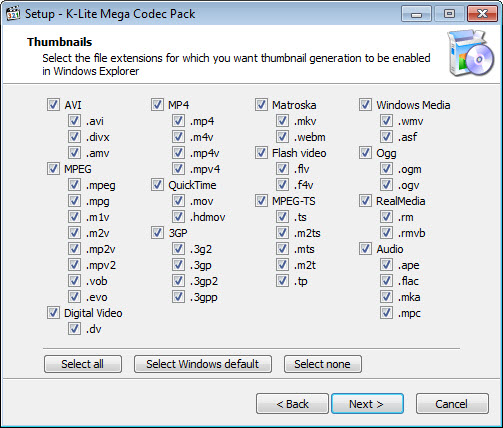
Subtitle rendering comes from a DirectVobSub build, thumbnails for video files in the file manager from Icaros, and a file inspector shows what a file contains.
The Standard and Full editions add the two renderers, MPC Video Renderer and madVR, which scale and tone-map video with far more care than the default, and the Full edition adds a plugin for 3D video. For a machine that only plays files, K-Lite Codec Pack Full is the sensible stopping point, and everything from here on is what Mega adds to it.
The Video for Windows and ACM codecs
Older editing and capture programs, the audience K-Lite Mega Codec Pack was built for, do not use DirectShow to encode. They use the far older Video for Windows and Audio Compression Manager interfaces, and they need codecs registered in those systems to save a file in a compressed format. Without them, such a program can read a file and cannot write anything but uncompressed video. Mega installs x264 for AVC, XviD for the older MPEG-4 ASP, and Lagarith and huffyuv for lossless capture and intermediate editing, plus the AC3ACM decoder and the LAME MP3 encoder on the audio side.
That is what makes VirtualDub and its relatives save usable files on a modern machine, and why this edition exists. A capture card’s software, an old screen recorder or a frame-server that asks for a Video for Windows codec is answered by this set and by nothing in the smaller editions.
For encoding with a modern program that carries its own encoders, none of this is needed.
ffdshow, the extra filters and GraphStudioNext
The ffdshow audio and video processors in K-Lite Mega Codec Pack apply effects and corrections in the playback chain, resizing, sharpening, deinterlacing, volume normalisation and more, in any player that uses DirectShow. They are old and marked in the pack as optional, since the LAV Filters do the decoding better, but as a processing stage for an older player they still have a use.
The Bass Audio Source filter plays tracker music and other audio formats the mainstream decoders skip, and the MPC Image Source filter opens still images as video sources. GraphStudioNext is the tool for people who build or debug DirectShow chains. It shows the filters a file passes through and lets them be rearranged, which is how a playback problem on one machine is diagnosed rather than guessed at. Everyone else never opens it.
Nor does a modern encoder such as HandBrake care about any of this, since it carries its own decoders and encoders and works identically with or without the pack.
The installer and its choices
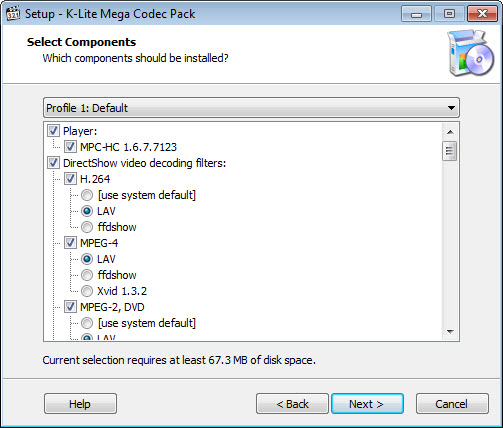
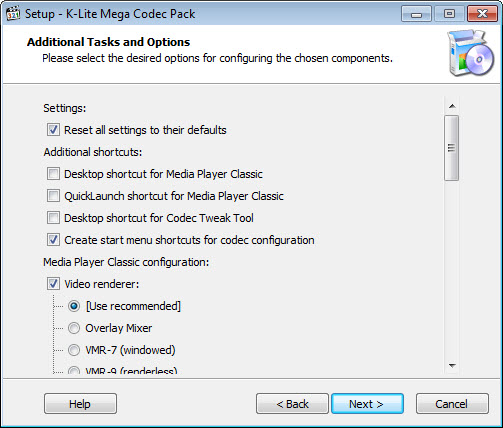
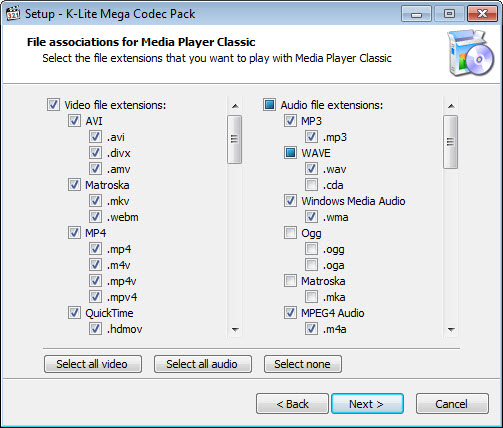
The K-Lite Mega Codec Pack installer is where the pack earns its reputation for being careful. A profile selector offers presets from a lean playback setup to the full set. A custom route exposes every component with a checkbox, so the Video for Windows codecs can be installed without ffdshow, or the renderers without the player. It detects codecs already on the machine and offers to remove conflicting ones, and it sets file associations only where you tell it to.
The Codec Tweak Tool, installed with every edition, is the maintenance side. It fixes broken filter registrations, resets associations, manages which decoder handles which format, and reports the state of the system’s codecs. It is the first thing to run when a file that played yesterday will not play today. An update check keeps the pack current, and the components are refreshed often.
Who should pick this edition, and who should not
Pick K-Lite Mega Codec Pack if you encode or capture with a program that asks for a Video for Windows codec. Pick it if you need the ffdshow processors in an old player, or if you debug playback chains. Those are real needs and this is the right answer to them. Pick a smaller edition if you only play files, because the Mega extras add registry entries, filters and installed codecs that an ordinary machine never calls, and more installed codecs means more to go wrong.
The pack’s own documentation says as much, recommending the smaller editions to most people. That honesty is one reason the pack has outlived nearly every rival. For checking what a stubborn file actually contains before blaming a codec, MediaInfo reads the streams, and the full edition of that tool is the big sibling of the lite one the pack includes.
Conclusion
K-Lite Mega Codec Pack suits people who edit, capture or encode with older programs that need Video for Windows codecs, and the few who build and debug DirectShow chains. The full playback setup of the smaller editions comes with it. For them it is the only edition that does the job.
For anyone who only watches video, it installs more than it should and plays nothing extra. Choose the smallest edition that answers your need, use the custom installer to leave out what you do not want, and keep the Codec Tweak Tool for the day a file stops playing.
Pros & Cons
- Everything in the Full edition, including the player, LAV Filters and both advanced renderers
- Video for Windows encoders x264, XviD, Lagarith and huffyuv for older editing and capture programs
- AC3ACM and LAME audio codecs for the same programs
- ffdshow processors, Bass and image source filters and GraphStudioNext
- Installer with profiles, per-component checkboxes and conflict detection
- Codec Tweak Tool for repairing registrations and associations
- Plays nothing the smaller editions cannot
- Installs codecs and filters an ordinary machine never uses
- ffdshow is old and optional even within the pack
- More installed components means more to troubleshoot
Frequently asked questions
No. All four editions decode through the same LAV Filters and play the same files. Mega adds encoding codecs and tools, not playback formats.
Anyone who encodes or captures with an older program that asks for a VFW or ACM codec, such as a classic frame-serving editor. Modern encoders carry their own.
Yes. The installer offers profiles and a custom route with a checkbox for every component, so the encoders can be installed without ffdshow or the player.
It repairs broken filter registrations, resets file associations, chooses which decoder handles each format and reports the state of the system's codecs.


