

Total Copier
About Total Copier
The built-in copy dialog has one job and does it grudgingly. No queue, so two transfers fight over the disk. No pause, so a copy started by accident runs to the end or gets killed. And when something fails, a bare message naming none of the files that did not make it. Total Copier replaces that dialog and fixes each complaint.
It takes over the copy dialog
Total Copier registers itself as the handler for copy and move operations, so no change of habit is required. Drag files as usual, or use the right-click menu, and its window appears instead of the standard one.
The first difference shows before anything is copied. It builds the complete file list first, so a folder you thought held two hundred files and actually holds nine thousand announces itself at the start rather than an hour in.
The queue and the job history
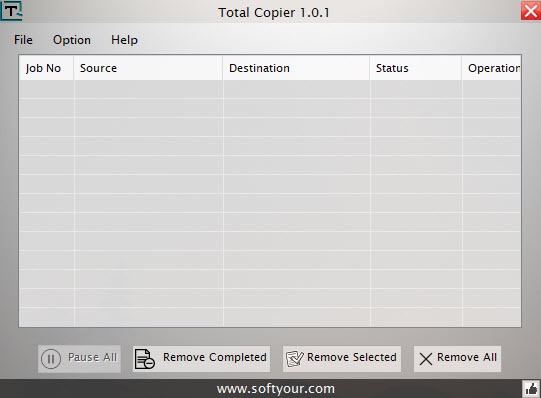
Running several transfers at once through the standard dialog slows all of them, since each competes for the same disk. Total Copier queues jobs instead, working through them in order, which finishes the set sooner even though each individual job waits its turn.
Every job is recorded, and that history is more useful than it sounds. A transfer interrupted by a restart or a disconnected drive can be resumed from the list rather than reconstructed from memory, and interrupted jobs can resume automatically.
When something does fail, the error log names the files rather than reporting a count. On a copy of several thousand items with three failures, knowing which three saves repeating the whole operation.
TeraCopy is the established name here and works the same way, so compare the two on a large transfer.
The settings that matter
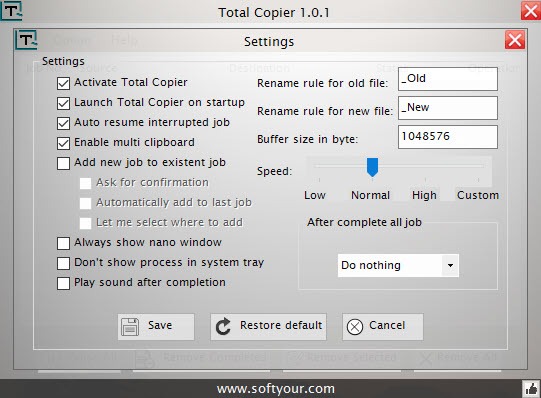
The Total Copier buffer size is adjustable, which is the setting that actually affects throughput, and transfer speed can be capped so a large copy does not make the machine unusable while it runs.
A free space check runs before starting rather than discovering the shortfall at ninety percent, which is the failure that wastes the most time.
Collision handling covers what happens when a file of the same name exists, with renaming rules rather than a prompt each time. Completion actions can play a sound or shut the machine down, which turns an overnight transfer into something you can walk away from.
Ultracopier replaces the system dialog the same way and exposes similar controls, so it is the other one to try.
What is missing, and what else is in the box
One absence matters more than any feature listed above. There is no checksum verification, meaning nothing compares the copy against the original to confirm they match.
For everyday copying that is fine, since a completed transfer is almost always correct. For archival work, moving a photo collection to a new drive or copying anything you cannot recreate, verification is the point of using a dedicated tool, and FastCopy verifies by checksum.
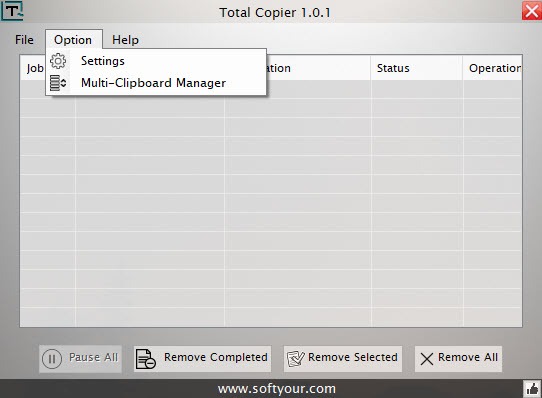
The other thing in the box is unexpected. A multi-clipboard holds up to nine entries, which is useful and has nothing to do with copying files. It works, and its presence here is the scope creep that makes a program harder to describe than it should be.
For keeping two folders matched rather than copying once, a synchronisation tool built for repeated comparison does that job properly with rules and a preview.
Conclusion
Total Copier fixes the specific irritations of the standard copy dialog, and it fixes all of them rather than one. Seeing the file count before starting, queuing rather than competing, pausing without losing progress, and getting a list of what failed instead of a shrug are each small improvements that add up to a noticeably calmer experience with large transfers.
The gap to weigh is verification. Without a checksum comparison this is a better copy dialog rather than a tool you would trust with irreplaceable material, so keep something that verifies for the transfers that matter and let this handle everything else.
Given that it takes over every copy operation on the machine, decide deliberately rather than by installing and forgetting.
Pros & Cons
- Replaces the system copy dialog, so no change of habit is needed
- Builds the file list first, showing the real scope before starting
- Queues transfers instead of running them against each other
- Pause and resume mid-transfer, with automatic resume after an interruption
- Job history allows any past transfer to be resumed or repeated
- Error log names the files that failed rather than reporting a count
- Free space check, adjustable buffer, speed limiting and completion actions
- No checksum verification, so a copy is never confirmed against the original
- Replacing the system copy handler affects every transfer, including ones you did not intend
- The multi-clipboard is unrelated to file copying and inflates the program's scope
- Development appears to have stopped, with the feature set settled
- Speed gains depend on the drives involved rather than on the software
Frequently asked questions
Yes, it registers as the handler for copy and move operations, so dragging files or using the right-click menu opens its window instead. That means every transfer goes through it, which is convenient and worth deciding on deliberately.
Yes, either automatically or from the job history, which records every transfer it has handled. A copy stopped by a restart or a disconnected drive can be picked up rather than started again.
No, and that is its most significant gap. Nothing compares the copy against the source, so anyone moving archival material should use a tool that verifies by checksum instead.
Holding up to nine separate clipboard entries so you can paste any of them rather than only the last thing copied. It is useful and entirely unrelated to file transfers.


