

Snap MD5
About Snap MD5
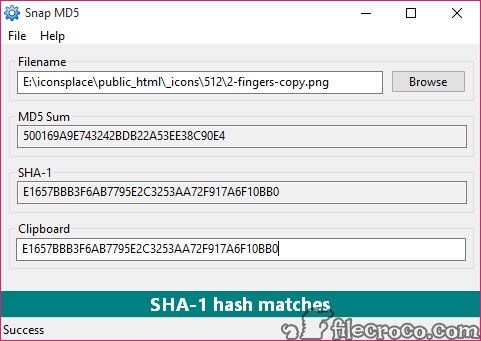
Snap MD5 is a lightweight tool that helps verify the integrity of downloaded files. It compares the MD5 or SHA-1 hash of a file against a known value to confirm whether the file has been altered or corrupted during download. This is especially useful when working with software installers, archives, or any files where accuracy is critical.
The utility is completely portable and does not require installation, making it ideal for on-the-go use.
Quick Setup and Easy Use
Getting started with Snap MD5 is effortless. You simply unzip the downloaded file and launch the executable. There is no installation process, and it doesn’t modify your system or leave any entries in the Windows registry.
To use the tool, paste the expected hash into the interface, select your file, and the software instantly checks and confirms whether the two values match. This helps ensure that your downloaded file is authentic and complete.
Portable and Unicode Compatible
Because it is a portable application, Snap MD5 can be stored on a USB drive and used from any compatible Windows system. It supports both 32-bit and 64-bit platforms.
The tool also recognizes file names written in other languages thanks to full Unicode support, which makes it versatile for users dealing with international file sets.
Drag-and-drop functionality further simplifies the process by letting you quickly add files without manually browsing for them.
Conclusion
Snap MD5 is a simple and effective tool for verifying that your downloaded files have not been tampered with or corrupted. Its portability, ease of use, and support for common hash types make it a reliable option for anyone needing quick file validation.
While it may lack advanced features, it gets the job done efficiently and with minimal setup.
Pros & Cons
- Does not require installation and leaves no traces in the system
- Verifies file integrity using MD5 and SHA-1 checksums
- Supports drag-and-drop and Unicode file names
- Only checks one file at a time without batch processing
- Does not support newer hash algorithms like SHA-256
- Limited to integrity checks and does not detect malicious content


