

Free42
About Free42
Free42 puts an HP-42S on your desktop. Not a picture of one, a working one. The HP-42S was the scientific programmable calculator that engineers and scientists kept long after it went out of production. They prized its Reverse Polish entry, its matrix and complex number handling, its solver and integrator, and a keystroke programming language that fit real work into a pocket.
This program rebuilds all of it from scratch, with no code or ROM from the original, and runs every program written for the real machine. Then it goes further, with a precision far beyond the original’s, an unlimited stack mode and extensions the hardware never had.
It comes in two builds, and the choice matters. The Decimal build uses 34-digit decimal arithmetic, so it behaves like the original on every rounding edge and runs old programs exactly as written. The Binary build uses the processor’s native floating point, which is faster and occasionally differs in the last digits, enough to trip a program that depends on exact decimal behaviour. Free42 also simulates the matching thermal printer, so program listings and traces print to a scrolling window or to a file.
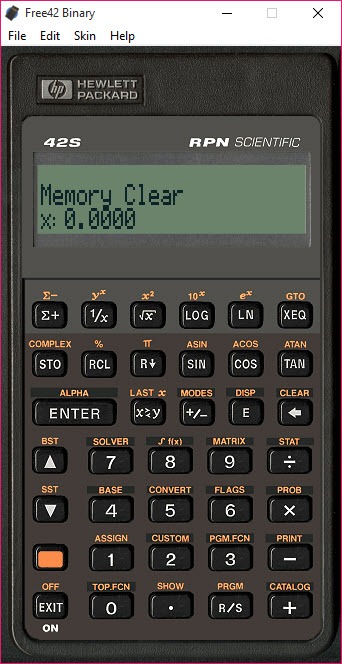
It is a single file that runs without installation, with skins that reproduce the original faceplate or offer plainer layouts. The sections below cover the calculator itself, the programming, the two builds, the printer and skins, and who it is really for.
The calculator, keystroke for keystroke
If you know the HP-42S, you know Free42. The keys are in the same places, the menus unfold the same way, and the four-level stack with Reverse Polish entry works as it always did. Type a number, press Enter, type another, press the operation. The scientific set is complete, with trigonometry, logarithms, probability, statistics with linear and curve fitting, base conversions, and unit-aware conversions through programs. Complex numbers are first-class, so a complex result sits in a stack register like any other value. Matrices are built, indexed and solved with the editor the original had.
The solver finds the root of any function you program, and the integrator computes a definite integral of one, both from menus that ask for the variable and the bounds. Named variables hold values and matrices between sessions, and the custom menu assigns functions and programs to the six soft keys under the display. For an owner of the physical calculator, the transition takes minutes. For anyone new to Reverse Polish entry, the first hour is an adjustment the manual covers.
Programming it
Free42 programs are written in the keystroke language of the original, line by line in the program editor, with labels, loops, tests, flags and subroutines, and run from the execute key or a custom menu slot. That language is the reason people still use the machine. A calculation done every day becomes a program in ten lines and a single key afterwards. A collection of programs written over a working lifetime for the real calculator runs here unchanged.
The program extends the language. A try-and-catch style of error handling lets a program recover from an error instead of stopping. An unlimited stack mode removes the four-register limit for those who want it, and the original four-level mode remains for programs that depend on it. Programs import and export as raw files, so they move between this program, the physical calculator and the pocket devices built on the same code, and a text conversion handles listings in plain text.
For a different lineage of calculator programming, Wabbitemu does the same job of running a graphing calculator’s programs on the desktop, with the original’s firmware rather than a rewrite.
Decimal or Binary, and why it matters
The original calculator computed in twelve decimal digits, and Free42 goes well beyond it. The Decimal build computes in thirty-four, in decimal, so a value like one tenth is held exactly. The rounding at each step matches what the hardware would have done, only with more room before anything is lost. Programs that test for equality after a chain of operations, or that depend on a particular rounding, behave as their authors intended.
The Binary build uses the machine’s native double-precision floating point. It is quicker on heavy loops and matrices, and most people would never notice the difference. But a tenth is not held exactly in binary, and a program that compares results to the last digit can fail. The project’s own advice is plain.
For full compatibility with the original and its programs, use Decimal. For speed on new work where the last digits do not matter, Binary is fine.
The printer and the skins
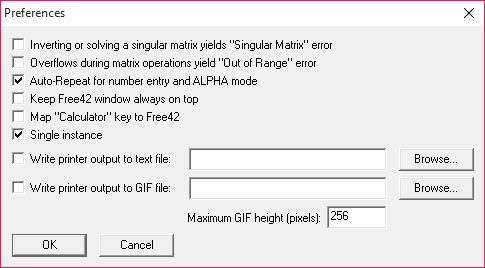
The thermal printer that paired with the original is simulated in Free42 too. Anything the calculator would have printed, program listings, traces of every operation in trace mode, matrix contents, appears in a print-out window that scrolls like paper tape. It can be saved as text or as an image file. Listing a program to the printer is how it becomes documentation.
Skins change the faceplate. The built-in ones reproduce the original’s look or offer a plainer, larger layout for a big screen, and community skins add horizontal layouts, high-resolution faces and alternative key labels. Keyboard mapping lets the physical keyboard drive the calculator, which is how fast users work, typing numbers and operators without touching the mouse.
Moving programs between a desktop and a pocket device is the same idea that a calculator link program serves for a different family of graphing calculators.
Who it is really for
The Free42 audience is specific and knows itself. Engineers and scientists who learned on the original and still think in Reverse Polish. Students sent to learn it because an instructor swears by it. Owners of the pocket device built from this program’s code who want the same calculator on the desk. Programmers of the old machine with a library of routines to keep alive. For all of them, this is the reference implementation, maintained steadily and, by the account of many long-time users, better than the hardware it recreates.
For someone who wants a quick desktop calculator with algebraic entry, it is the wrong tool, and its interface will feel like a puzzle. For a faithful recreation of other vintage hardware in the same spirit, an Apple II emulator shows how far the preservation of old machines has come.
Conclusion
Free42 suits anyone who knows and loves the HP-42S, from the engineer who never put the original down to the student learning Reverse Polish entry. It suits anyone with a library of programs for the machine to keep running. The recreation is complete, the Decimal build is exact, and the extensions improve on the hardware without breaking it.
It is a calculator for people who want this calculator, and it makes no effort to be anything else. Choose Decimal unless you need speed, map the keyboard, and an old workflow runs on today’s desk.
Pros & Cons
- Complete HP-42S recreation that runs every program written for the original
- Decimal build with 34-digit precision for exact compatibility, Binary build for speed
- Solver, integrator, matrices, complex numbers and statistics as on the hardware
- Extensions including error handling, an unlimited stack and extra functions
- Thermal printer simulation with listings saved as text or image
- Skins, keyboard mapping and a single file that runs without installation
- Reverse Polish entry and the original's menus are a learning curve for newcomers
- Binary build can fail programs that depend on exact decimal behaviour
- Interface reproduces a calculator, so it is small and keystroke-driven by design
- No algebraic entry mode
Frequently asked questions
Decimal for exact compatibility with the original calculator and its programs. Binary for speed on new work where the last digits do not matter.
Yes. Programs import as raw files and run unchanged, and the Decimal build matches the original's arithmetic behaviour.
Yes. It simulates the matching thermal printer in a scrolling window, and the output saves as text or as an image file.
Yes. Keyboard mapping drives the calculator from the physical keyboard, and the mapping can be changed.


