

MyHotSpot
About MyHotSpot
MyHotSpot turns a PC into the control centre of a public Wi-Fi network, the kind found in hotels and cafés. Guests connect to your wireless network and land on a login page before they reach the internet. From there, they sign in with a user account or a prepaid code, and the software decides how long they can stay online and how fast.
It is not a simple “share my laptop’s connection” tool. The program is a hotspot management system with billing and bandwidth control built in. It runs on a PC sitting between your internet connection and the wireless access point, or it can create the wireless network itself with a companion tool.
How the network is wired
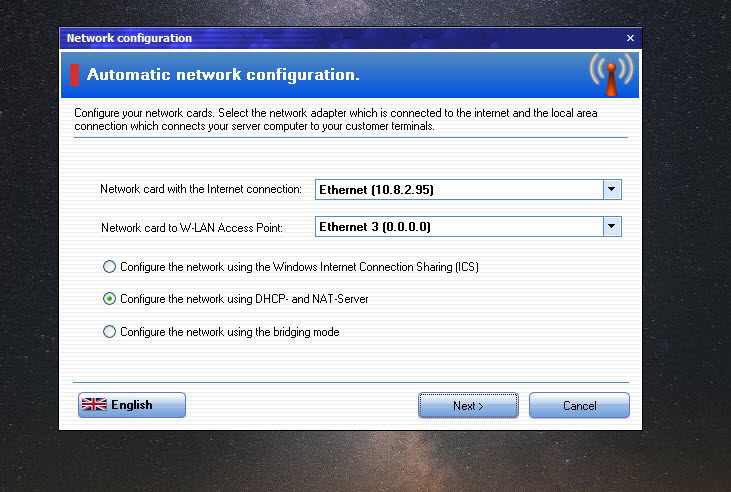
The usual setup puts the hotspot PC in the middle. One network card faces the internet, and the other connects to the LAN port of a wireless access point or router, not its WAN port. Every guest then passes through the PC, where the login page and all limits apply.
For smaller spaces, a physical access point is optional. MyHotSpot works with a virtual Wi-Fi access point created on the PC itself, through a companion tool called WiFiCreator or the system’s built-in mobile hotspot. That suits a small café running everything from one laptop.
WiFiCreator lets you pick the network name and password, protects the network with WPA2 encryption, and even works without an internet connection, which is handy for a local network at a workshop or LAN party.
Network sharing can run through Internet Connection Sharing, through the program’s own DHCP and NAT server, or in bridging mode. The PC can also share a VPN connection, so all guest traffic leaves through the tunnel instead of your own public address.
That keeps abuse complaints about guest browsing away from the venue’s main connection, and it separates guest traffic from office systems on the same line. If all you need is a personal hotspot for your own devices, Connectify Hotspot is the simpler fit.
A branded login page for every guest
Before anyone gets online, the browser shows your login page. You design it with your own logo and colours, so the hotspot looks like part of the venue rather than a generic portal. Guests authenticate with a user account, a prepaid code or an SMS verification, and multi-login settings decide whether one code may be used on several devices at once.
Some websites can stay open without logging in. A hotel might allow its own booking page, a café its menu, and a school its learning platform. A white MAC list lets trusted devices, such as staff laptops or a point-of-sale terminal, bypass the login entirely.
Open access with no authentication is also possible when you only want filtering and limits.
Prepaid codes and online payment
Billing is where MyHotSpot separates itself from home hotspot tools. You can create user accounts with time or data allowances, or print batches of prepaid codes to hand out at the counter. Flat rates cover guests who should simply get unlimited access for a period, such as a hotel stay.
Guests can also buy access themselves through PayPal on the login page, paying by card without staff involvement. The program tracks each session’s data volume and time online, and cuts access when the allowance runs out.
That turns the hotspot into a small source of revenue for the venue.
Bandwidth limits and filtering
One guest streaming in 4K can ruin the connection for everyone, so the bandwidth manager matters. You set speed limits per user or per plan, and dynamic allocation redistributes unused bandwidth to active users rather than leaving it idle.
Filtering keeps the network clean. Port and service filters block traffic types you do not want. File sharing can be blocked to stop peer-to-peer downloads, and the built-in firewall adds another layer. An ad blocker strips advertising from guest browsing, which also saves bandwidth. Together, these settings stop a single heavy user or a misbehaving device from dragging the whole network down.
To see which programs on the hotspot PC itself are using the connection, a visual network monitor shows it per application.
Session monitoring and URL logs
The management view lists every active session in a table, with the user, device, data used and time online. You can disconnect anyone from there, check who is using the most traffic, and see at a glance how busy the hotspot is.
The program can also record all session activity, including the websites each user visits. That helps with troubleshooting and abuse reports, but it carries real legal obligations. In many countries, logging browsing history means informing users in your terms of use and keeping the data in line with privacy law, so set the retention period deliberately.
For a quick look at which devices are actually on your wireless network, a small network scanner gives an independent view.
Conclusion
MyHotSpot suits hotels and cafés, but also schools and gaming centres, that want to offer Wi-Fi with control, from branded logins and prepaid codes to bandwidth limits and online payment. It gives a small venue the core features of commercial hotspot systems on a single PC.
It expects careful network setup and a responsible approach to logging guest activity. Home users only looking to share a connection should choose a simpler tool, while venues needing control will find it a capable foundation.
Pros & Cons
- Branded login page with accounts, prepaid codes and SMS verification
- Guests can pay for access themselves through PayPal
- Per-user bandwidth limits with dynamic allocation
- Port filters and file sharing blocking, backed by a firewall
- Whitelisted websites and a MAC list for trusted devices
- Works with a physical access point or a virtual hotspot on the PC
- Network setup needs care, especially the two-adapter layout
- Overkill for sharing a connection with a few personal devices
- URL logging brings privacy obligations the venue must handle
Frequently asked questions
Not necessarily. It can work with a physical access point connected to the PC, or with a virtual access point created on the PC through WiFiCreator or the built-in mobile hotspot.
Either with prepaid codes sold at the counter or by paying online through PayPal on the login page. Accounts with time or data limits are also supported.
Yes. The bandwidth manager sets per-user or per-plan limits, and dynamic allocation shares unused capacity among active users.
Yes. Add their MAC addresses to the white list, and they connect directly. Specific websites can also be opened to everyone without logging in.


