

Memtest86
About Memtest86
If you’ve ever experienced a computer randomly crashing, programs corrupting their saved files, or random blue screens with errors that don’t quite make sense, faulty RAM is one of the prime suspects worth investigating.
Memory errors are particularly nasty because they manifest as seemingly unrelated software bugs, file corruption, and instability that can drive technicians and users to madness chasing software causes for what’s actually a hardware problem.
Memtest86 is the standard tool that the technical community reaches for when ruling RAM in or out as the source of these mysterious problems.
Originally developed in 1994 by Chris Brady and now maintained by PassMark Software, this software has become the industry-standard RAM diagnostic tool used by technicians, system builders, and serious users for decades. The current version 11.0 (released June 2024) brings full DDR5 support, modern UEFI booting, and various refinements that keep the tool relevant as memory technology evolves.
There’s also an open-source fork called Memtest86+ that picks up where the original BSD-licensed code left off, but the current PassMark-developed version represents the actively maintained primary lineage.
Bootable testing outside the operating system
The defining feature of Memtest86 is that it doesn’t run inside your operating system at all. The tool boots directly from a USB drive into its own minimal environment, takes complete control of the machine, and tests memory without any operating system competing for those memory addresses.
This approach is essential for thorough RAM testing because operating systems reserve substantial portions of memory for their own operation, making in-OS testing fundamentally incomplete.
By running outside the OS, the tool can access and test virtually all installed RAM, including the regions that operating systems use for kernel structures, drivers, and other purposes that prevent in-OS testing tools from reaching them. This complete coverage matters because intermittent memory errors don’t necessarily appear in the user-accessible memory regions that lighter testing tools examine.
The boot-from-USB approach also means the tool runs identically regardless of what OS is normally on the computer. The same testing capability applies whether the machine normally runs current systems, older releases, or something completely different, since the testing environment is independent of any installed software.
Comprehensive algorithm coverage
The current version uses 14+ different test algorithms that target various failure modes RAM can exhibit. Different memory failures show up under different stress patterns, and no single test catches everything. A chip that passes simple write-and-read tests might still fail under specific bit-flip patterns, sequential access stress, or particular addressing sequences that trigger latent flaws.
The algorithm variety means the tool catches subtle problems that simpler tests miss. Memory that fails only under specific access patterns, errors that only appear when adjacent rows are accessed rapidly, problems that emerge after extended testing time rather than immediately-all of these scenarios get covered through the diverse test algorithm suite.
For users running short tests as a quick verification, the algorithm subset still provides reasonable confidence. For users running comprehensive overnight tests on suspect systems, the full algorithm suite provides the kind of thorough coverage that genuine fault diagnosis requires.
Row Hammer detection for modern threats
A particularly notable algorithm is the Row Hammer test, which detects a specific type of memory vulnerability where rapid repeated access to certain memory rows can cause bit flips in adjacent rows even without direct access to those locations.
Row Hammer is both a reliability concern (random data corruption) and a security concern (exploitable for privilege escalation attacks), and modern memory testing needs to verify whether installed RAM is susceptible.
The detection works by performing the rapid access patterns that trigger Row Hammer effects, then checking whether bit flips occurred in expected locations. RAM that fails this test isn’t necessarily defective in the traditional sense, but it does have characteristics that can cause real-world problems and that suggest the modules may not provide the reliability that critical applications need.
For users building systems for long-term reliability, particularly servers or workstations handling important data, this Row Hammer testing provides a perspective that traditional pattern-based tests miss entirely.
DDR5 support and modern memory standards
The current version provides full support for DDR5 RAM including SPD (Serial Presence Detect) reading that identifies module specifications, DDR5-specific error tracking that handles the on-module ECC that DDR5 introduces, and EXPO/XMP 3.0 profile reporting that shows the high-performance memory profiles installed RAM advertises.
For users on current systems with DDR5, having a memory tester that actually understands DDR5 architecture matters. DDR5 introduces several differences from previous DDR generations, including the on-die ECC, dual-channel-per-DIMM design, and various other architectural changes. Older memory testers either don’t run on DDR5 systems at all or test them as if they were earlier DDR generations, missing the DDR5-specific concerns.
The XMP/EXPO profile reporting is particularly useful for users running their RAM at advertised performance speeds (rather than conservative defaults), since it confirms whether the system actually applied the high-performance profiles and shows which specific profile is active. For overclocking enthusiasts and users seeking the rated performance of their memory, this profile visibility addresses common configuration verification needs.
ECC error detection and reporting
For systems using ECC (Error-Correcting Code) memory, the tool detects and reports both corrected errors (where the ECC successfully fixed a single-bit flip) and detected errors (multi-bit errors that ECC could detect but not correct). This visibility into ECC behavior provides important data about memory reliability that ECC’s silent correction otherwise hides.
In normal operation, ECC memory automatically corrects most single-bit errors without any indication that anything happened. This silent correction works fine for occasional cosmic-ray-induced flips, but a high rate of corrected errors indicates a memory module that’s beginning to fail and should be replaced before it produces uncorrectable errors that crash systems.
For server administrators and users running critical workloads on ECC systems, having visibility into the corrected error rate helps identify failing modules early rather than waiting for catastrophic failures.
Modern UEFI environment with mouse support
The current version runs in a 64-bit native UEFI environment with a graphical interface and mouse support, modernizing what used to be a strictly text-based tool. The visual interface makes test progress, error reports, and configuration options more accessible than earlier versions that required keyboard navigation through text screens.
The 64-bit native code provides up to 30% speed improvements over older 32-bit versions, which matters for full memory tests where the difference between 6 hours and 8 hours of testing time is genuinely significant. For systems with large amounts of RAM (32GB, 64GB, or more), these speed improvements make comprehensive testing more practical to actually run.
The mouse support is a small but appreciated detail for users who prefer point-and-click interaction over keyboard navigation. Configuration options, individual test selection, and various other settings become more discoverable when you can hover and explore rather than navigating menu trees blindly.
ARM64 support beyond traditional x86
Recognizing the increasing prevalence of ARM-based systems, the current version supports ARM64 hardware in addition to traditional x86 and x86-64 processors. This expansion means the tool works on the growing range of ARM-based laptops, workstations, and embedded systems that previous versions couldn’t address.
For users on ARM-based hardware (whether by choice or because it’s what their employer provides), having a capable memory tester that works on the actual hardware rather than requiring x86 systems matters for verification scenarios. The same testing capabilities apply across both architecture types, providing consistent diagnostic capability regardless of the underlying processor.
Production line and PXE boot automation
For commercial use cases, the application supports full automation through configuration files and PXE network boot, enabling production-line memory testing scenarios where dozens or hundreds of systems need consistent verification. Configuration files specify which tests to run, when to stop, what to do with results, and various other parameters that make unattended testing practical.
PXE boot eliminates the need to physically insert USB drives into each test system, with computers booting the testing environment directly from a network server. For repair shops, manufacturing operations, or any context where memory testing happens at scale, this automation transforms what would be tedious manual work into a streamlined automated process.
Pro edition with additional capabilities
The application is available in both Free and Pro editions, with the Pro version adding capabilities aimed at professional users. The most notable Pro feature is the ability to pinpoint exactly which DIMM/chip is faulty when errors are detected, which matters when systems have multiple memory modules and you need to know which specific one to replace.
Other Pro features include detailed reporting capabilities, advanced configuration options, and various other enhancements aimed at technician and commercial use. For casual users running occasional memory tests, the Free version provides essentially everything needed.
For repair shops and serious users running tests regularly, the Pro features pay back their cost through faster fault isolation.
Conclusion
Memtest86 has earned its position as the industry-standard RAM diagnostic tool through decades of refinement and active development that has kept it current with evolving memory technology.
The combination of comprehensive algorithm coverage, modern hardware support including DDR5 and ARM64, Row Hammer detection, and the ability to run outside any operating system delivers exactly the diagnostic capability that serious memory testing requires.
It’s not a tool you need every day, and casual users may go years without ever running it. But when memory becomes a suspect in mysterious system instability, when a new system needs verification before deployment, or when a technician needs to confirm whether faulty RAM is causing customer complaints, Memtest86 delivers exactly what’s needed, with the kind of accuracy and depth that simpler tools simply can’t provide.
Pros & Cons
- Boots independently of the operating system for complete memory access
- 14+ test algorithms catch various RAM failure modes
- Row Hammer detection identifies modern memory vulnerabilities
- Full DDR5 support including SPD reading and EXPO/XMP profile reporting
- ECC error detection provides visibility into corrected errors
- Modern UEFI environment with graphical interface and mouse support
- 64-bit native code up to 30% faster than older versions
- ARM64 support beyond traditional x86/x64 systems
- Production-line automation through configuration files and PXE boot
- Free version covers most user needs adequately
- Full memory tests can take many hours on systems with substantial RAM
- Pro features (including DIMM identification) require paid license
- Some advanced features assume technical knowledge for proper use
- Bootable USB creation requires separate steps before testing
- Older legacy BIOS systems require older versions of the tool
Frequently asked questions
This software is a memory diagnostic tool that boots from a USB drive and tests installed RAM for errors using a comprehensive suite of algorithms. By running outside the operating system, it can test virtually all installed memory and detect a wide range of memory failure modes that lighter in-OS testing tools miss entirely.
Operating systems reserve substantial memory for their own operation, making complete in-OS memory testing impossible. Booting outside the OS gives the tool unrestricted access to all installed RAM, ensuring the testing covers every memory address rather than just the user-accessible regions that in-OS tools can reach.
A complete test of all algorithms takes several hours, with duration scaling based on installed RAM size. Systems with 8GB might complete in 2-3 hours, while systems with 64GB or more can require overnight runs. For quick verification, individual algorithm tests provide partial coverage in shorter time, though comprehensive fault detection requires the full suite.
Row Hammer is a memory vulnerability where rapid repeated access to specific memory rows can cause bit flips in adjacent rows. This causes data corruption and can be exploited for security attacks. Modern memory testing includes Row Hammer detection because traditional pattern-based tests don't trigger this specific failure mode that can cause real-world reliability and security problems.
Yes, version 11.0 includes full DDR5 support including SPD reading for module identification, DDR5-specific error tracking that handles on-module ECC, and EXPO/XMP 3.0 profile reporting. For users on current systems with DDR5, having a memory tester that genuinely understands the architecture is essential rather than optional.
The Free edition provides full memory testing capabilities suitable for most user needs. The Pro edition adds capabilities aimed at professional use, including the ability to pinpoint exactly which DIMM/chip is faulty when errors are detected, detailed reporting, and advanced configuration options. For casual users, Free is adequate; for technicians and serious users, Pro features pay back their cost through faster fault isolation.
Yes, the current version supports ARM64 hardware in addition to traditional x86 and x86-64 systems. For users on ARM-based laptops, workstations, or embedded systems, the same testing capabilities work on the actual hardware rather than requiring x86 systems for verification.
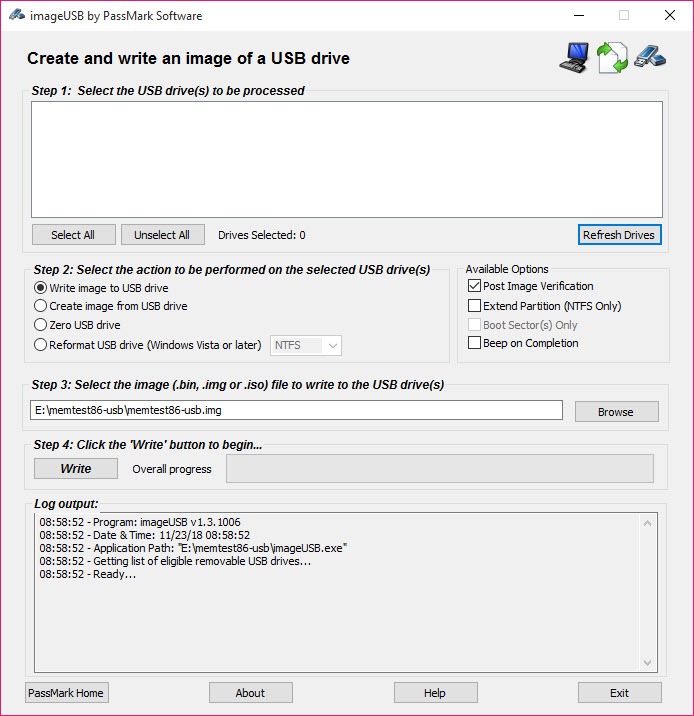
The download includes a USB creation utility that handles the bootable drive creation automatically. You provide a USB drive, run the included tool, and the result is a properly configured boot drive that the tool can launch from. The process is simpler than creating bootable drives manually with separate utilities.
Detected errors indicate that the memory module read back different values than what was written, which signifies hardware-level memory faults. With the Free edition, the test confirms errors exist but identifying the specific faulty module may require swapping modules and retesting. The Pro edition can typically pinpoint the exact faulty chip directly.
Running memory tests on new systems before relying on them for important work catches the small percentage of new RAM that ships with defects. For build verification, server commissioning, or any system that will handle critical workloads, an initial memory test provides confidence that the foundation is solid before any data corruption issues emerge in normal operation.
Memtest86+ is a separate community-maintained open-source fork that branched off when the original Memtest86 transitioned to PassMark's development. Both projects continue independently, with this version being commercially developed (with Free and Pro editions) and Memtest86+ being entirely open source. Both are capable tools, with the choice often coming down to feature priorities and licensing preferences.


