

.NET Framework
About .NET Framework
.NET Framework is the layer many desktop programs stand on. A program written for it does not carry its own copy of the libraries it needs for windows, files, networking and graphics. It expects to find them already installed, and it refuses to start when they are missing.
That is the moment most people meet the name, in an error box that says the application requires a particular release of it. Install the release it asks for and the program opens. Nothing about the program itself has changed. The floor it needed is simply in place.
It is a runtime, then, not a program you open, and it has a long history that explains its quirks. .NET Framework comes in two generations that live side by side, installs partly as a system feature and partly as a download, and has been joined by a successor that confusingly carries almost the same name. It is still supported, as a component of the system it ships with, and it is in maintenance, receiving fixes rather than features. T
he sections below cover what it does, which release a program wants, how the installers behave, how to repair a broken installation and how it relates to the newer platform.
What it does for a program
A program built on .NET Framework is compiled into an intermediate form rather than into machine code. When it starts, the framework’s runtime turns that into instructions for the processor and manages the memory, the security checks and the libraries behind the scenes.
The program’s author writes against a large class library covering everything from text and dates to databases and web requests, and the framework supplies it on every machine.
That is why a small utility can arrive as a tiny file. The heavy parts are already on the system. It is also why the error appears when they are not. Programs such as Paint.NET are built on this foundation, which is why their installers check for it first.
Two generations, side by side
.NET Framework splits into an older generation and a current one, and they do not replace each other. The older generation, which bundles its own earlier releases inside it, is kept for programs that were never updated. On current systems it is not installed by default. It is switched on as a system feature, and the system fetches it, which is the step that fails on a machine without a working connection or on a managed network that blocks it.
The current generation installs in place. Each release replaces the one before it, so a machine has one copy of the current generation at a time. A program that asks for an earlier release of that generation is satisfied by a later one. That is why installing the newest release cures most of the error boxes at once, and why a program demanding the older generation is a separate job.
Which release a program wants
The error box usually names the release. Match it to the generation. If it names something from the older line, enable that system feature. If it names something from the current line, install the newest current release, which covers it. A program that still refuses after that is asking for something else, often a separate runtime altogether, and its own documentation says which.
When several programs on one machine fail together after a reinstall of the system, the current generation is almost always the missing piece. Install it once and run the system’s updates, since fixes for the framework arrive through the same channel as the rest of the system.
Other runtimes have the same pattern, and Java Runtime Environment is the one that most often sits beside this one on a working machine.
The small download and the full one
The current .NET Framework generation comes as two installers. The web installer is small and fetches what it needs during setup, which is fine on a connected machine. The offline installer carries everything inside it, which is the one to keep on a stick for machines with no connection, for reinstalls and for a batch of computers set up at once. Both end at the same result.
The installer checks the system and refuses if the release is already present or is built into that version of the system, with a message to that effect. That refusal confuses people who are trying to fix a broken installation, because it looks like a failure. It is not. It means the release is there, and the fix lies elsewhere.
Repairing a damaged copy
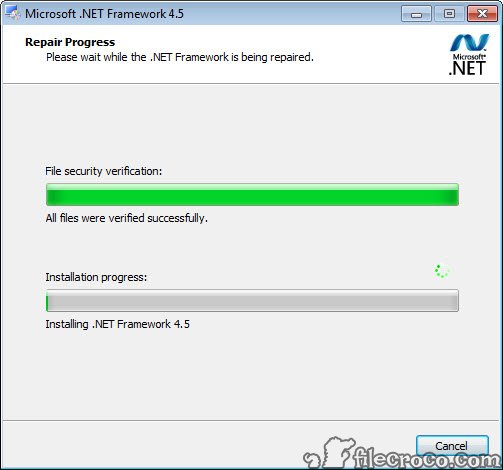
A .NET Framework installation can be damaged, and the signs are specific. A program crashes the instant it starts, or a newer release of the framework refuses to install. The maker publishes a dedicated repair tool for exactly this case. It checks the installed releases, resets their registration and repairs what it finds, and it is the first thing to run before anything more drastic.
If the repair tool does not settle it, the next steps are to run the system’s own file checker and then its component cleanup, since the framework’s files are part of the system on current releases. Reinstalling the framework over itself does not work, because the installer refuses, which is why the repair tool exists.
The successor with the same name
The newer platform is called simply .NET, without the word Framework, and it is a different product. Programs built for it ship with their own runtime or ask for a separate .NET runtime of a particular release, with its own installers and its own support dates. Installing it does nothing for a program that wants the framework, and the other way round.
The confusion is understandable, and the rule is simple. An error that says .NET Framework wants this product. An error that says .NET runtime, with a number alone, wants the other one. Both can be installed on the same machine without conflict, and a working computer today usually has both.
For inspecting what a given program was actually built against, a .NET assembly decompiler opens the file and shows its target.
Conclusion
.NET Framework suits anyone who has met the error box and wants the program behind it to start. It also suits anyone setting up a machine who would rather install the foundation once than discover it program by program. Install the newest release of the current generation, enable the older one if a program asks, and keep the offline installer for the next reinstall.
It is a runtime in maintenance, not a product with a future beyond keeping existing programs alive, and its naming invites confusion with its successor. Read the error message carefully, pick the generation it names, and the fix is usually one installer.
Pros & Cons
- Lets many desktop programs run without carrying their own libraries
- Newest release of the current generation covers programs asking for earlier ones
- Offline installer for machines without a connection and for reinstalls
- Dedicated repair tool for damaged installations
- Supported as a system component with no end date announced
- Two generations that must be installed separately
- Installer refuses to run when the release is already present, which looks like a failure
- Older generation needs a connection or special handling to enable
- Easily confused with the newer platform of almost the same name
Frequently asked questions
The program was built on it and expects its libraries to be installed. Install the release the message names, or the newest release of the current generation, and the program starts.
The newest release of the current generation covers programs asking for earlier releases of that generation. A program asking for the older generation needs that enabled as a system feature.
It refuses when the release is already present or built into the system. That is not a failure. If a program still crashes, use the repair tool instead.
No. The newer platform called .NET is a separate product with its own runtimes. An error naming .NET Framework wants this one, and both can be installed together.


