

ePSXe
About ePSXe
ePSXe is the PlayStation 1 emulator that defined PC-based PSX gaming for the better part of two decades and still holds a place in plenty of retro setups. The application reproduces the original Sony hardware closely enough that the catalog runs at significantly higher resolutions than the console ever managed, with optional texture filtering, widescreen hacks, and frame-rate stability that the original 33 MHz MIPS R3000 could not dream of. Games keep their original feel while looking sharper than they ever did on a CRT.
What makes ePSXe specifically interesting is its plugin architecture. Graphics, sound, CD reading, and controller input are each handled by swappable modules built to the PSEmu Pro plugin specification. You pick the renderer you want, pair it with the audio driver that suits your system, and the result is a configuration tuned to your hardware.
The same emulator can run on a low-power laptop with the software plugin or push enhanced output through Pete’s OpenGL2 plugin on a modern GPU. Flexibility is the whole point.
The plugin system and why it still matters
The plugin model is ePSXe in a nutshell. Instead of building one monolithic renderer, the emulator delegates each hardware subsystem to an external DLL. The classic pairing is Pete’s OpenGL2 GPU plugin for graphics, P.E.Op.S. SPU for audio, and either the internal CDR or P.E.Op.S. CDR for disc handling. Each plugin has its own configuration window with dozens of parameters.
Pete’s OpenGL2 alone exposes options for internal resolution multipliers up to 16x, texture filtering modes from nearest neighbor through xBRZ, framebuffer effects, offscreen drawing, and shader injection. You can spend an afternoon tuning a single game. Some players love this, others find it overwhelming.
The trade-off is that good configuration is non-trivial. If you want a plug-and-play experience, other modern alternatives auto-detect settings and present cleaner defaults. ePSXe rewards patience but punishes assumption. Newer versions did add an option that bundles built-in plugins to simplify first-time setup, which closes some of the gap.
BIOS requirements and the legal grey zone
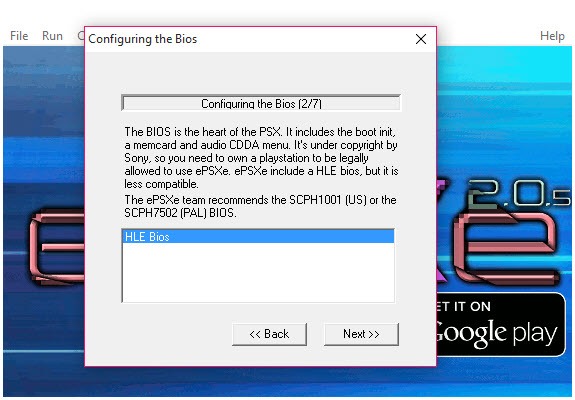
This is the part the application cannot help with. ePSXe requires a genuine PlayStation BIOS file to function properly. The expected file is typically SCPH-1001 for the US region, SCPH-7001 for later US units, SCPH-1002 or SCPH-7502 for PAL regions, and SCPH-1000 or SCPH-5500 for Japanese games. These files are not distributed with the emulator for reasons everyone understands.
The application includes an HLE BIOS option, a high-level emulation substitute that approximates what the real BIOS does. It works for many games but is known to fail on titles that touch specific firmware routines, sometimes resulting in black screens at the developer logo or save corruption. The HLE path is a fallback, not a replacement.
Once you provide a real BIOS, the emulator places it in the bios subfolder and exposes the selection in the Config menu. Multiple BIOS files can coexist, which is useful if you switch between regions for imports or specific releases.
Disc image formats and what works out of the box
ePSXe handles .bin/.cue pairs natively, which is the standard format for PSX dumps. Single-track .iso files load directly. The PBP container, used by PSP PlayStation Classics, is also supported through built-in handling. CHD compressed images work with the right CDR plugin.
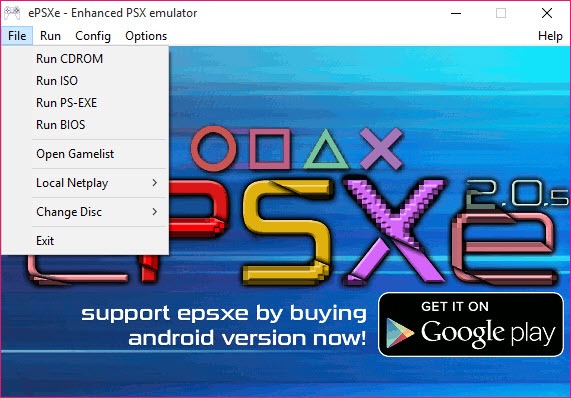
What does not work natively is .ecm, the old error-correction-compressed format. You have to decompress those first with an external tool. Multi-disc games are handled through the Run Iso menu, which lets you swap discs mid-game for titles like Final Fantasy VII, Chrono Cross, or Metal Gear Solid. The disc swap dialog appears when the game asks for the next disc, which is more elegant than older emulators that required manual reconfiguration.
For organizing a large library of disc images alongside other emulator collections, a unified launcher like Emu Loader sits on top of ePSXe and presents the catalog with cover art and metadata. The two work well together.
Controller setup and the DualShock question
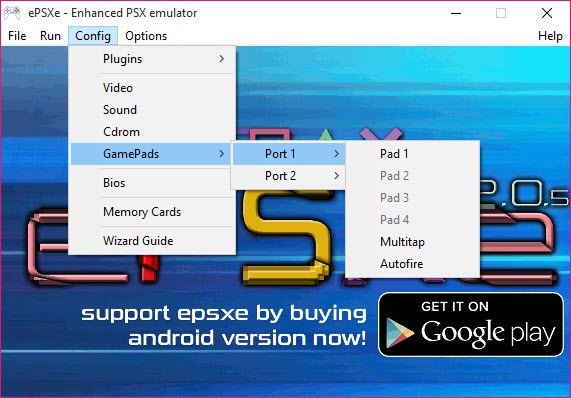
Controller support is where the emulator has matured significantly. Newer revisions added native XInput support, which means Xbox 360 and Xbox One controllers, plus most third-party gamepads that present an XInput interface, work without additional configuration. You plug in the controller, open Config, Game Pad, Pad 1, and assign buttons through the standard mapping screen.
DualShock 4 controllers technically work but require DirectInput mode or a passthrough tool like DS4Windows to expose them as XInput devices. Once set up, the analog sticks, pressure-sensitive face buttons, and rumble all function correctly. The rumble support specifically maps to the original game’s vibration events, so titles that used it shake at the right moments.
The analog mode toggle deserves a mention. Some PS1 games like Ape Escape or specific racing titles only work with analog enabled. The emulator exposes a hotkey to switch the virtual controller between digital and analog modes, mimicking the button on the original DualShock. New users sometimes miss this and assume the game is broken.
Save states, memory cards, and the save data ecosystem
The application implements both native memory card emulation and modern save states. Memory cards are stored as .mcr files in the memcards folder, with two slots available per game session matching the two memory card slots on the original hardware. The .mcr format is interchangeable with other PS1 emulators, so you can move saves between ePSXe, no$psx, or PCSX-Reloaded without conversion.
Save states are stored separately and let you snapshot the entire emulator state at any point. There are five slots per game, accessible through F1 through F5 to save and F3 through F7 to load (the exact mapping is configurable). Save states are not compatible across emulators because they capture internal CPU state and plugin memory, but they are perfect for the kind of mid-boss save-scumming that pure memory card saves never allowed.
For backing up the entire saves folder, any standard backup utility works since the .mcr files are just binary blobs. They are small, typically 128 KB per card, so a folder of forty cards still occupies under 6 MB.
Cheats, codes, and the Pec integration
The emulator supports GameShark-style cheat codes through an internal code engine. Codes are stored as .cht files per game, and the Cheat menu lets you toggle individual codes on or off mid-game. The format is the classic eight-character hex pattern used by physical cheat devices, which means decades of community-collected codes still work without conversion.
There is also integration with Pec, an external cheat manager that maintains a larger code database and can push codes into the emulator session. Setting up Pec is fiddly because it relies on specific file paths and version compatibility, but for players who want extensive cheat support without manually entering codes, it is the established route.
Real limitations
The emulator shows its age in some areas. The interface is dated, the dialog windows do not scale well on high-DPI monitors, and some of the plugin configuration screens use cramped layouts. Modern alternatives like DuckStation have left this part of the user experience behind by a wide margin.
Accuracy is another point. ePSXe is fast and compatible but not bit-perfect. Several games have known graphical glitches that more accurate emulators handle correctly, including specific shadow rendering in Silent Hill and certain transparency effects in Vagrant Story. For most players these are invisible. For purists they are reasons to look elsewhere.
There is also no automatic update system. The emulator does not check for new releases, does not notify when plugins have updates, and does not validate that your plugin versions are mutually compatible. Users coming from RetroArch or DuckStation find this primitive. For game capture during play sessions, a tool like Dxtory handles the recording side since the emulator itself has no built-in recorder.
Conclusion
ePSXe is the right choice for players who want fine-grained control over how their PlayStation library looks and sounds, and who do not mind spending time on plugin configuration to get there. It handles the bulk of the PS1 catalog at high resolution with stable framerates, supports modern controllers, and has the deepest configuration surface of any PSX emulator that has survived from the early era.
The application is also no longer the default recommendation it once was. Newer emulators offer higher accuracy, friendlier interfaces, and automatic configuration that ePSXe has not matched. What keeps it relevant is the depth of customization, the community of users who have already tuned plugin settings for specific games, and the simple fact that for thousands of titles it just works the way you expect after fifteen minutes of setup. It is a tool with a learning curve, not a turnkey solution, and that is exactly what some retro enthusiasts still prefer.
Pros & Cons
- Mature plugin architecture lets you tune graphics, sound, and CD handling per game
- Native XInput controller support covers most modern gamepads without extra setup
- Save states and standard .mcr memory cards both work, giving flexibility in how you save
- Strong compatibility with the majority of the PS1 catalog, including multi-disc games
- Pete's OpenGL2 plugin pushes internal resolution to 16x with optional shader injection
- Cheat code support uses the classic GameShark format with decades of community codes available
- Plugin configuration has a steep learning curve compared to modern auto-configuring emulators
- HLE BIOS substitute is unreliable for games that touch specific firmware routines
- UI scales poorly on high-DPI displays and the dialog windows feel cramped
- Less accurate than newer emulators for specific edge cases like shadows and transparencies
- No built-in update mechanism for the emulator or its plugins
- ECM compressed images are not supported natively and require external decompression first
Frequently asked questions
A genuine PlayStation BIOS file, a configured graphics and sound plugin, and a disc image in .bin/.cue, .iso, or PBP format. Without the BIOS, the HLE substitute can run some games but fails on others.
This usually means the HLE BIOS is being used and the game expects specific firmware routines. Switching to a real BIOS file in Config, BIOS, then restarting the game typically fixes it.
Most PS1 games default to digital mode. You enable analog using the F5 hotkey during gameplay, or through the controller config screen. Some titles require analog from the start, others let you toggle anytime.
Yes. When the game asks for the next disc, use the File, Run Iso menu to load the second image while the emulator is paused. The disc swap is handled cleanly and the save resumes on the new disc.
PAL games run at 50 Hz and NTSC games at 60 Hz. If the emulator is set to the wrong region or the framerate limiter is off, the game speed will drift. Check Options, Video, and confirm the auto frame limit is enabled.
No. The emulator only writes to memory cards when the game itself saves, just like the original hardware. Save states are manual and require pressing the save hotkey to capture state.
Memory cards persist between sessions and match the original PlayStation save system. Save states snapshot the entire emulator state at any moment and are tied to ePSXe specifically, so they cannot be moved to other emulators.
Yes. The cheat menu accepts standard GameShark hex codes and stores them in .cht files per game. Codes can be toggled on or off mid-game without restarting.


