

Rootkit Remover
About Rootkit Remover
Most malware announces itself sooner or later, through popups, ransom notes, or a browser that suddenly has opinions about your homepage. A rootkit does the opposite. It buries itself in the deepest layer of the system, hides its own files and processes, and then quietly protects other malware from being found. Your antivirus reports a clean machine because the rootkit is filtering what the antivirus is allowed to see.
Rootkit Remover exists for exactly this blind spot, a small standalone scanner built to look underneath the layer where ordinary security tools operate.
The tool targets a handful of notorious rootkit families by name, including ZeroAccess, Necurs, and the TDSS line, threats that hijacked millions of machines by embedding themselves in kernel drivers and the boot record. Rootkit Remover runs without installation, finishes a scan in a few minutes, and removes what it recognizes after a restart.
What exactly is a rootkit, and why does a normal scan miss it?
A regular scanner asks the operating system questions. Which files are in this folder, which processes are running, which drivers loaded at boot. A rootkit answers those questions on the system’s behalf and simply leaves itself out of every answer. That is the whole trick, and it works disturbingly well. The infection can run a click-fraud botnet or download fresh malware every night while the machine looks spotless in every scan.
The warning signs are indirect. Security software that crashes or refuses to update, settings that revert on their own, heavy disk or network activity while the computer sits idle, and the occasional crash screen with no obvious cause.
None of these proves a rootkit, but together they justify checking with a tool that does not trust the system’s own answers.
How Rootkit Remover approaches detection
Instead of asking the system what is running, Rootkit Remover inspects the low-level structures directly, comparing what the kernel claims against what actually sits on disk and in memory. Discrepancies between those two views are how rootkits get caught.
The scan focuses on the specific families it was built for, checking known driver names, hidden services, and modifications to the boot record that the ZeroAccess and TDSS clans made their signature move.
That focus is both the strength and the honest limitation. Against the families on its list, detection is precise and removal is thorough. Against a rootkit outside that list, the tool stays silent, which is why it complements a broad scanner like Malwarebytes rather than replacing it.
Think of it as a specialist you call in for a suspected problem, not a general practitioner.
Running a scan, and what to expect
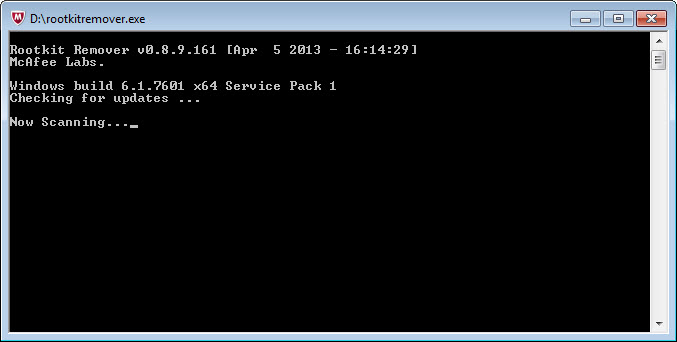
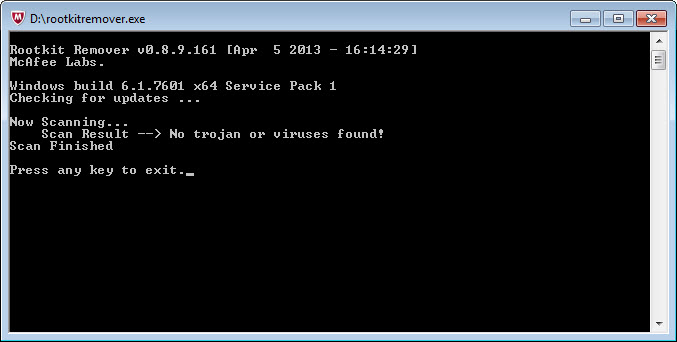
There is nothing to install. You launch the executable with administrator rights, a console window opens, and the scan starts on its own. The interface is text in a black window, progress lines and a verdict, no dashboard or animation anywhere. Some will find that off-putting. We find it fitting, since a cleanup tool you run twice a year has no business decorating itself.
A typical scan completes in two to five minutes because it checks targeted locations rather than every file on the drive. If something turns up, the tool neutralizes the components it can reach immediately and asks for a restart to finish the job, since a rootkit’s driver cannot be safely torn out while it is running. Run the scan once more after rebooting to confirm the removal held. Deep infections sometimes need a second pass, and stubborn cases call for a cross-check with TDSSKiller, which hunts overlapping families with a different detection method.
Where it fits in a cleanup routine
A sensible order matters more than any single tool. Start with the rootkit scan precisely because rootkits shield everything else. Once the hiding layer is gone, a full scan with a portable second-opinion scanner like Dr.Web CureIt! can finally see what was being protected, and something like AdwCleaner sweeps up the adware and browser junk that usually rode in alongside.
Reversing the order wastes effort, since scanners running on top of an active rootkit are reading censored results.
The tool receives updated definitions regularly, and using a freshly downloaded copy matters more here than with most software, because rootkit families mutate specifically to dodge the previous round of detection.
Conclusion
Rootkit Remover does one narrow job with the seriousness it deserves. It looks beneath the layer where ordinary scanners operate, recognizes some of the most damaging rootkit families ever spread, and removes them with a scan that costs you five minutes and a restart.
It belongs in the toolkit of anyone who cleans infected machines, whether that is your own computer behaving strangely or the family laptop that arrives every holiday with new problems. Keep expectations calibrated, it is a specialist and not a suite, and as the opening move of a cleanup it has few equals.
Pros & Cons
- Detects kernel-level threats that hide from conventional scans
- Portable executable with no installation and no leftovers
- Scans finish in minutes by targeting known rootkit locations
- Removal handles drivers and boot-record changes, completed by a restart
- Ideal first step that unmasks malware for other scanners to clean
- Coverage is limited to specific rootkit families, not a general detector
- Console-only interface offers no logs viewer or scheduling
- No real-time protection, it only works on demand
- An already-running rootkit can sometimes block the scanner from launching
Frequently asked questions
Watch for indirect symptoms. Security software that crashes or cannot update, settings reverting by themselves, and disk or network activity on an idle machine all point toward something hiding below the surface.
No. It hunts a specific class of threat that hides from regular scanners, then steps aside. Keep a full scanner for everyday protection and use this tool when symptoms suggest something deeper.
A rootkit's driver runs inside the kernel and cannot be removed while active. The restart lets the tool finish the removal before the infection loads again.
Run a second specialist with different detection methods, then a full scan from a portable second-opinion tool. No single scanner sees every family, and persistence pays off with this class of infection.


