

Autorun Angel
About Autorun Angel
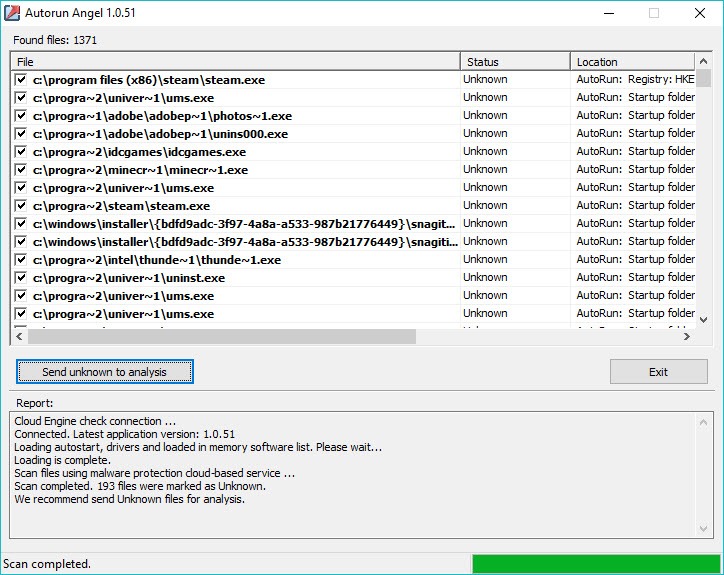
Autorun Angel lists everything that starts with your computer and tells you which of it is known to be harmless. Open it and a list fills with the programs and drivers set to run at startup, plus the processes already running in memory, each with its path and where it was found.
Press Scan, and the program checks every file against a cloud database of known-good software. The files it recognises as harmless vanish from the list. What remains is the short set that is either unknown or flagged as malicious, which is the set you actually need to look at.
That is a different approach from an antivirus. Instead of hunting for known bad files it strikes out the known good ones, which turns several hundred startup entries into a handful in seconds. Autorun Angel then stops.
It does not remove anything and does not disable anything. It points, and leaves the next step to you, which is both its honesty and its limit. The sections below cover the list, the cloud check, what to do with the leftovers, and where the approach runs out.
The startup list
The first Autorun Angel screen is the inventory. Every autorun location the program knows is read, from the registry keys and startup folders to scheduled tasks and services, and the running processes are added from memory. Each entry shows the file name, the full path, a status column and the source, so a driver loaded from an odd folder stands out before any scan runs.
That list alone is useful. It is the inventory a technician builds by hand when a machine misbehaves, assembled in seconds. It needs to run as administrator to read all of the locations, and it runs from a single file, so it suits a rescue stick.
For the deepest view of the same territory, with every autorun category and the ability to disable entries, a process and system explorer from the same family of tools goes further.
The cloud check
Press Scan in Autorun Angel and each file’s fingerprint goes to the cloud database, which answers with a verdict. Known-good files drop out of the list. Known-bad ones are marked. Everything else is marked unknown. The check takes well under a minute, since only fingerprints travel, and nothing is stored locally.
The cloud side is still maintained, with its database updated regularly. Without a connection the list still appears and the verdicts do not.
What to do with the unknowns
Here is where expectations about Autorun Angel need setting. The database knows the common software, and it does not know everything, so a scan leaves a list of unknowns that are mostly harmless. Testers reported dozens of unknowns on a clean machine, many of them obvious system components judging by their folders. Unknown does not mean suspicious. It means the database has not seen that exact file.
The tools for the leftovers are in the right-click menu. Show details for a file. Look it up in the program’s own database or search the web for its name. Send unknown files for analysis, so the database learns them for everyone. A log records the scan and any errors, and the whole list copies to the clipboard for a forum post or a support ticket.
For a second opinion on a file that stays suspicious, Malwarebytes scans it with a behaviour-based engine, and the two together settle most cases.
Where the approach runs out
Autorun Angel analyses and never acts. A malicious file it marks stays exactly where it was until you remove it with something else, and a startup entry it flags stays enabled. The unknown list is long on any machine with unusual software, and sorting through it is work. The interface is plain and dated, and the program itself has not changed in a long time, though its cloud database has.
None of that makes it useless. It makes it a first look rather than a cure. For disabling or delaying startup entries once you know which are safe, Startup Sentinel watches the startup locations and lets you block new entries as they appear.
For removing what this one marks as malicious, a removal tool is the next step.
Conclusion
Autorun Angel suits anyone who wants a quick first look at what starts with their computer and which parts are known to be harmless. That covers a home user whose machine has slowed down and a technician triaging a suspect laptop. The strike-out approach turns hundreds of entries into a short list in seconds.
It stops at pointing, its unknowns need patience, and it needs a connection to say anything. Run it as administrator, sort the unknowns by folder before worrying, and keep a removal tool beside it for the one entry that turns out to be real.
Pros & Cons
- Lists every startup entry and running process, with its path and source, in seconds
- Cloud check strikes out known-good files, leaving only unknowns and threats
- Right-click lookups and details, plus a button to submit unknowns for analysis
- Runs from a single file as administrator, with a log and clipboard export
- Cloud database still updated, with nothing to download locally
- Analyses only, with no removal or disabling of entries
- Long lists of unknown files on machines with unusual software
- Needs an internet connection for verdicts
- Interface and program have not changed in a long time
Frequently asked questions
No. It identifies startup entries and running files as known-good, unknown or malicious, and leaves removal to you or to a dedicated tool.
The cloud database knows common software, not everything. Unknown means it has not seen that exact file, not that the file is suspicious. Submit unknowns for analysis to improve it.
The startup list appears offline, but the verdicts need an internet connection to the cloud database.


