

JoyKeyMapper
About JoyKeyMapper
JoyKeyMapper is the Windows utility that solves a specific and surprisingly common problem, getting Nintendo Switch controllers to work properly as input devices outside of Switch games. Joy-Cons and the Pro Controller connect to Windows over Bluetooth easily enough, but the operating system treats them as generic HID devices with confused button mappings, no XInput support, and motion controls that no application knows what to do with. JoyKeyMapper sits in the middle and translates everything into keyboard, mouse, or standard gamepad input that any Windows application understands.
The application targets a narrow but real use case. PC gamers who own Switch controllers and want to use them for desktop games. Emulator users who prefer the Joy-Con form factor. People who play short sessions on the couch with a single Joy-Con held sideways.
None of these scenarios work cleanly with the default Windows handling of Switch hardware, and JoyKeyMapper fills that gap with a dedicated mapping interface designed around how Switch controllers actually behave.
Why Switch controllers are awkward on Windows
The Joy-Con and Pro Controller use a slightly non-standard Bluetooth HID profile. Windows pairs them successfully, recognizes them as input devices, and exposes their buttons through the legacy DirectInput interface. The problems start there. Button labels are scrambled (A and B swap positions relative to Xbox convention), the analog sticks report values on unusual axes, the SR and SL buttons on the side rails are recognized but unlabeled, and the motion sensors and IR camera are not exposed at all.
For a Switch user expecting their controller to feel familiar, this is jarring. Games that assume Xbox-layout buttons show the wrong prompts. Games that use XInput natively do not see the Joy-Con at all (it shows up as a generic DirectInput device). And the half of Joy-Con functionality that depends on the gyroscope simply does not work without dedicated software handling it. The hardware capability is there but Windows does not know what to do with it.
JoyKeyMapper reads the Joy-Con’s full input stream over Bluetooth, including the motion data Windows ignores, and exposes everything through a configurable mapping layer. The controller becomes useful in applications that would otherwise reject it.
For users with PS3 controllers facing a different version of the same problem, Better DS3 and MotioninJoy handle that hardware. The Switch-specific approach JoyKeyMapper takes recognizes that each controller family has its own quirks worth solving directly.
Single Joy-Con horizontal mode and the sideways layout
This is a feature unique to Switch controllers and one that JoyKeyMapper handles well. A single Joy-Con held sideways becomes a tiny standalone controller, with the stick acting as a D-pad equivalent, the four face buttons becoming the action cluster, and the SR and SL rail buttons functioning as the shoulder buttons. Nintendo designed this for impromptu multiplayer where two players share a single Switch set.
The application includes a horizontal mode profile that remaps everything accordingly. The left Joy-Con held sideways becomes one controller with its own complete mapping. The right Joy-Con held sideways becomes a second independent controller. Two players can each grab one Joy-Con and play a two-player local game on the same PC, without needing a second proper gamepad.
This is genuinely useful for couch multiplayer on retro emulator games. Imagine sitting on a couch with two Joy-Cons split between two people, running an old SNES game on Snes9x or a Genesis title on Kega Fusion (a retro emulator commonly paired with controller utilities).
The setup takes a couple of minutes and produces a multiplayer experience the original consoles intended but PC emulation usually requires hunting down two compatible controllers to recreate.
Motion control mapping and the gyro mouse use case
The Joy-Con’s gyroscope is one of its more useful sensors, and Windows knows nothing about it natively. JoyKeyMapper reads the gyro data and lets you map motion to virtual mouse movement, virtual keyboard input, or analog stick output depending on what makes sense for the target application.
The most popular use is gyro-as-mouse for first-person shooters and aiming-sensitive games. Aiming with a thumbstick has a known precision ceiling that gyro motion exceeds easily. By tilting the controller slightly for fine adjustments and using the stick for broad turns, players get console-style camera control with the precision closer to a mouse user. This is the Steam Controller workflow that Switch players never had natively on PC.
The mapping is configurable. You can set sensitivity per axis, define a deadzone for the gyro (some controllers report tiny background motion even when held still), and bind a trigger as the “engage gyro” button so the motion only activates when you want it.
The latter is essential for games where the controller might rest at unusual angles, like when held in lap.
Button mapping and the keyboard output paths
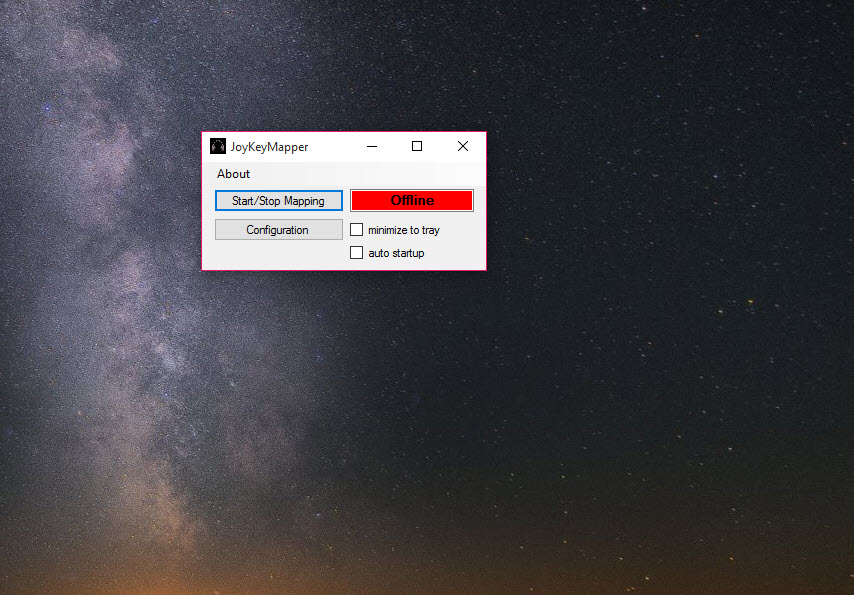
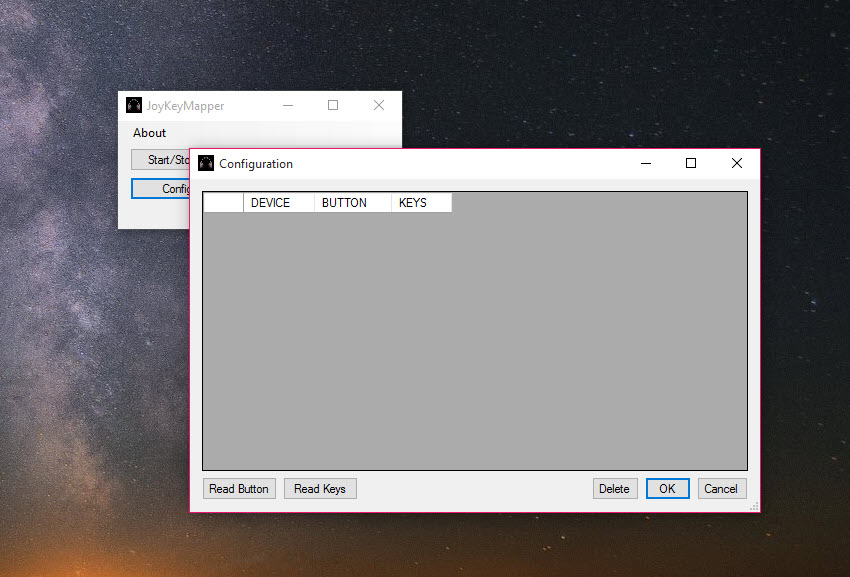
Beyond the controller-specific Joy-Con handling, JoyKeyMapper does the same thing every input mapper does, mapping any button or axis to any keyboard key, mouse button, or scroll input. Map B to spacebar, the right stick click to F11 for fullscreen, the SR button to Tab, and so on. The configuration interface lets you click a field and press the desired output to record the binding.
The application supports multiple profiles, switchable per-game or globally. You might have a profile for emulator use where the Switch buttons map to natural game controller positions, a separate profile for a specific PC game where you want WASD on the stick and spacebar on a face button, and a third profile for desktop use where the controller drives the mouse cursor. Profile switching is a hotkey or a tray menu option.
For users wanting an even more capable input remapping environment that goes beyond Switch controllers, reWASD is the premium option with deeper macro support, and AntiMicro is the open-source generic alternative for any gamepad. JoyKeyMapper stays narrower and that focus is the appeal for Joy-Con and Pro Controller owners specifically.
Pro Controller and the standard gamepad workflow
The Switch Pro Controller has its own quirks. The button positions match a more traditional gamepad than the Joy-Con, but Windows still treats it as a generic DirectInput device rather than XInput. Games that require XInput (the modern Xbox controller API that most PC games default to) do not see the Pro Controller at all.
JoyKeyMapper can create a virtual XInput device backed by the Pro Controller input. To Windows and to games, this looks like an Xbox controller. The Pro Controller’s actual buttons drive the virtual XInput device, which means any game that supports Xbox controllers now supports the Pro Controller seamlessly. This is the same general approach DS4Windows uses for DualShock 4 controllers and that InputMapper uses across multiple controller families.
The Pro Controller workflow benefits from including motion controls in the virtual XInput emulation, when the target application supports gyro through XInput’s newer extensions. Older XInput-only games ignore the motion entirely, in which case the gyro can still drive separate keyboard or mouse output through the standard mapping layer.
Comparison to JoyToKey and the broader mapping space
Anyone researching input mappers for Windows runs into JoyToKey, which has been around for many years and remains the most widely-recommended generic option. JoyKeyMapper differs in being purpose-built for Switch controllers, with handling for the specific HID quirks, motion controls, and form factors that generic mappers do not address.
For users with non-Switch controllers, JoyToKey is the broader-compatibility choice. It works with any DirectInput controller, has a long history of compatibility refinements, and handles the basic button-to-keyboard mapping use case well. Where it falls short is Joy-Con specifics, motion control handling, and the dual-Joy-Con horizontal mode that JoyKeyMapper handles natively.
The decision between the two comes down to which controllers you actually own. Multiple non-Switch gamepads, JoyToKey. Specifically Switch controllers, JoyKeyMapper. Many users install both for different controllers in their collection, which is also a perfectly reasonable approach.
Real limitations
The application is specifically designed for Switch controllers and does not pretend to be a universal input mapper. Other gamepads work to a degree (anything DirectInput-compatible can be mapped to keyboard output), but the Joy-Con and Pro Controller specific features are wasted on them. If your primary controller is an Xbox or DualShock gamepad, this is not the right tool.
Bluetooth connection stability is occasionally an issue. Joy-Cons in particular are sensitive to interference and connection range. The application cannot fix the underlying Bluetooth stack reliability, and users sometimes encounter dropouts, lag spikes, or pairing problems that have nothing to do with the mapping software itself. A USB connection where possible (the Pro Controller supports USB-C) is more reliable for long sessions.
The interface is functional rather than polished. Configuration is straightforward but visually basic, and complex mappings can become unwieldy to manage across multiple profiles. For users wanting a slicker configuration experience, alternatives like reWASD invest more in the UI side at the cost of a paid license. JoyKeyMapper is free and direct, which suits its target audience.
Conclusion
JoyKeyMapper is the right choice for Switch controller owners who want their hardware to work properly across the wider PC gaming ecosystem. The specific handling of Joy-Cons, the horizontal mode for couch multiplayer, the motion control mapping for FPS aiming, and the virtual XInput emulation combine into a tool that respects how the controllers were designed rather than treating them as generic DirectInput devices.
The application is narrow by design. Users with mixed controller collections often pair it with broader tools for non-Switch hardware. Within its lane, it solves the specific problem of making Switch controllers feel native on Windows, and the focus on that lane is precisely why it works better for that use case than generic mappers ever could.
Pros & Cons
- Built specifically for Joy-Con and Pro Controller hardware, handling Switch-specific quirks natively
- Supports horizontal single-Joy-Con mode for impromptu two-player setups on one PC
- Maps gyro motion to mouse or analog stick output for precision aiming in PC games
- Virtual XInput emulation makes Switch controllers appear as Xbox gamepads to any game
- Multiple profiles allow per-game configurations switchable through hotkeys or tray menu
- Free and open-source, with the focused codebase that comes from a single-purpose tool
- Specifically designed for Switch controllers, less useful for other gamepad families
- Bluetooth connection issues with Joy-Cons can cause dropouts that the application cannot fix
- Interface is functional rather than visually polished compared to premium alternatives
- Profile management becomes complex with many games and configurations to track
- Some advanced mapping scenarios (complex macros, conditional bindings) are beyond the scope
- Documentation assumes a baseline familiarity with how Joy-Cons connect and behave on Windows
Frequently asked questions
Primarily Nintendo Switch Joy-Cons (both individually and as a pair) and the Switch Pro Controller. Other DirectInput-compatible controllers work for basic button-to-keyboard mapping but lose the Switch-specific features like horizontal mode and motion controls.
Yes. The application can create a virtual XInput device backed by your Joy-Con or Pro Controller, so games expecting an Xbox controller will recognize and accept the Switch input.
Yes. The gyroscope data from Joy-Cons and the Pro Controller can be mapped to mouse movement or analog stick output, with configurable sensitivity and deadzone settings.
Pair the Joy-Con through standard Windows Bluetooth settings first. Hold the small sync button on the rail until the lights flash, then add it as a new device in Windows. Once paired, the application detects the controller automatically.
Yes. The horizontal mode profile treats each Joy-Con held sideways as an independent controller, so two players can each take one Joy-Con and play a two-player local game on the same PC.
The Pro Controller supports both Bluetooth and USB-C connections. Joy-Cons typically use Bluetooth, with the option of using the official Joy-Con grip charger if more stable connection is needed.
JoyToKey is a generic input mapper for any DirectInput controller. JoyKeyMapper is built specifically for Switch controllers, with native handling of motion controls, horizontal mode, and the specific HID quirks of Joy-Con and Pro Controller hardware.
Standard rumble support works with games that drive rumble through the virtual XInput device. The Joy-Con's HD rumble (the fine-grained linear actuator effects) is a Switch-specific feature that PC games do not generate signals for, so the more nuanced rumble effects of the original platform are not reproduced.


